Classes and Objects in Java: Definition, Examples and Programs
Introduction
Classes and Objects in Java are essential concepts in object-oriented programming (OOP). A class defines the structure of an object, while an object represents an instance of that class. Therefore, understanding these concepts helps beginners write organized, reusable, and easy-to-maintain Java programs.
Java uses classes and objects to represent real-world entities. For example, a student has a name, age, and course. Similarly, a Student class can define these properties, while individual student objects store different values.
Furthermore, classes and objects form the foundation of inheritance, encapsulation, polymorphism, and abstraction. These concepts help developers build larger applications with clear structures. As a result, they are important topics in Java interviews and practical programming.
If you are a college student, recent graduate, or career changer in Chennai, learning Java can help you explore software development opportunities. However, memorizing definitions alone is not enough. You also need to practice writing programs and solving real problems.
In this guide, you will learn Java classes and objects through simple definitions, syntax, examples, practical programs, and frequently asked questions. Additionally, you will discover how structured learning can help you develop job-ready programming skills.
Table of Contents
- What is a class in Java?
- What is an object in Java?
- What is the difference between a class and an object?
- How do classes and objects work in Java?
- What is the syntax for creating a class and object?
- What are the practical Java programs?
- Why are classes and objects important?
- What is the difference between self-learning and structured training?
- Frequently asked questions
- Conclusion
What Is a Class in Java?
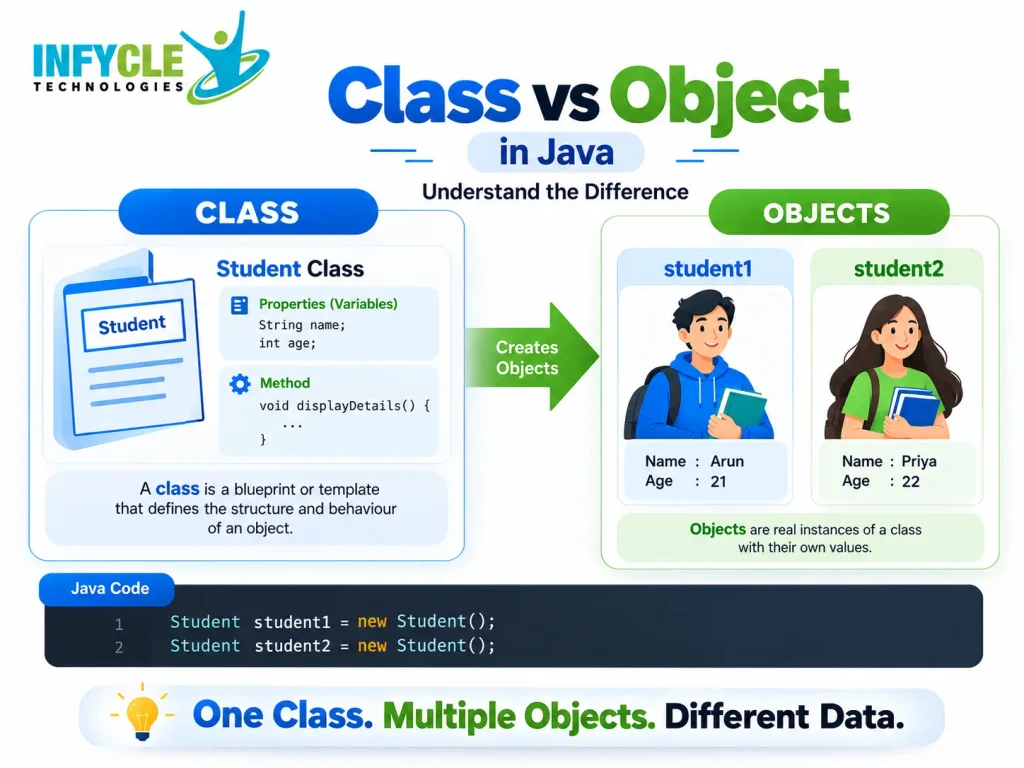
A class in Java is a blueprint that defines the properties and behaviors of objects. It can contain variables, constructors, methods, and other class members.
For example, imagine designing a blueprint for a car. The blueprint describes its color, model, and functions. However, the blueprint itself is not a physical car.
Similarly, a Java class defines how its objects should behave. Therefore, developers use classes to organize related data and methods in one place.
What Are the Main Components of a Java Class?
A Java class commonly contains these components:
- Fields: Store data, such as a student’s name or age.
- Methods: Define actions, such as displaying student details.
- Constructors: Initialize objects when they are created.
- Objects: Represent individual instances of the class.
For instance, a Student class might contain a name field, an age field, and a displayDetails() method. Consequently, each student object can store different information while sharing the same structure.
What Is an Object in Java?
An object in Java is an instance of a class that can hold data and use defined behaviors. It represents a specific entity created from a class blueprint.
For example, consider a Student class. You can create two objects named student1 and student2. Each object can store a different name and age.
Furthermore, an object has three commonly described characteristics:
- State: The data stored in its fields.
- Behavior: The actions available through its methods.
- Identity: The individual identity that distinguishes it from other objects.
Consider a car object. Its color represents its state, its start() method represents its behavior, and its identity distinguishes it from another car object.
Therefore, objects help programmers represent real-world entities within Java applications.
What Is the Difference Between a Class and an Object?
A class defines a structure, whereas an object is an instance created from that structure. Although they are closely related, they serve different purposes in Java programming.
| Class | Object |
|---|---|
| Defines a blueprint | Represents an instance |
| Declares fields and methods | Holds instance-specific data |
Uses the class keyword | Commonly created using new |
| Defines a common structure | Uses the structure defined by its class |
Example: Student | Example: student1 |
For example, Student is the class, while student1 and student2 are individual objects. Both objects can use the same methods, but their field values can differ.
Therefore, remember this simple comparison: a class is a blueprint, and an object is an instance of that blueprint.
How Do Classes and Objects Work in Java?
Classes and objects work together to organize data and behavior. First, you define a class. Next, you create an object and use its fields or methods.
Consider a class named Student. It defines a student’s name and a method that displays the name. Afterward, you can create an object and call that method.
For example, the following program demonstrates this process:
class Student {
    String name = "Karthick";

    void displayName() {
        System.out.println(name);
    }
}

public class Main {
    public static void main(String[] args) {
        Student student1 = new Student();
        student1.displayName();
    }
}
Output:
KarthickHere, Student defines the class, and student1 refers to the created object. The new keyword creates the object, while displayName() prints the student’s name.
As a result, this example shows how a class defines behavior and an object uses it.
What Is the Syntax for Creating a Class and Object?
Java uses the class keyword to declare a class and the new keyword to create an object. You can then access accessible members through the object reference.
How Do You Declare a Class?
Use the following syntax to declare a class:
class ClassName {
    // Fields

    // Constructor

    // Methods
}
For example, a Car class can define a color field and a start() method. Moreover, you can add constructors to initialize each car’s details.
How Do You Create an Object?
Use the following syntax to create an object:
ClassName objectName = new ClassName();For example:
Car car1 = new Car();Here, Car is the class name, car1 is the reference variable, and new Car() creates a new object.
However, creating an object does not automatically execute every method in its class. You must call the required method explicitly, unless another language mechanism invokes it.
What Are the Practical Classes and Objects Programs in Java?
Practical programs help beginners understand how Java classes and objects work. Therefore, start with simple examples before moving to constructors, multiple objects, and user input.
Program 1: How Do You Create a Simple Java Object?
This program creates a Car object and displays its color. It demonstrates how to access an instance field through an object reference.
class Car {
    String color = "Blue";
}

public class Main {
    public static void main(String[] args) {
        Car car1 = new Car();

        System.out.println(car1.color);
    }
}
Output:
BlueHere, car1.color accesses the object’s color field. Consequently, the program prints Blue.
Program 2: How Do You Create Multiple Objects in Java?
You can create multiple objects from the same class. Each object can maintain its own instance field values.
class Student {
    String name;

    void display() {
        System.out.println(name);
    }
}

public class Main {
    public static void main(String[] args) {
        Student s1 = new Student();
        Student s2 = new Student();

        s1.name = "Arun";
        s2.name = "Priya";

        s1.display();
        s2.display();
    }
}
Output:
Arun
Priya
Both objects use the same Student class. However, each object stores a different name, demonstrating the value of instance-specific data.
Program 3: How Do You Use a Constructor in Java?
A constructor initializes an object when you create it. For example, you can pass a student’s name to a constructor instead of assigning it afterward.
class Student {
    String name;

    Student(String studentName) {
        name = studentName;
    }

    void display() {
        System.out.println(name);
    }
}

public class Main {
    public static void main(String[] args) {
        Student s1 = new Student("Karthick");
        s1.display();
    }
}
Output:
KarthickThe constructor receives the name and assigns it to the instance field. Therefore, the object begins with the specified name.
Program 4: How Do You Create an Object with Multiple Fields and Methods?
A class can contain several fields and methods. For instance, the following program stores employee details and calculates an annual salary.
class Employee {
    String name;
    double monthlySalary;

    Employee(String name, double monthlySalary) {
        this.name = name;
        this.monthlySalary = monthlySalary;
    }

    double calculateAnnualSalary() {
        return monthlySalary * 12;
    }

    void displayDetails() {
        System.out.println("Name: " + name);
        System.out.println(
            "Annual Salary: " + calculateAnnualSalary()
        );
    }
}

public class Main {
    public static void main(String[] args) {
        Employee emp = new Employee("Arun", 25000);
        emp.displayDetails();
    }
}
Output:
Name: Arun
Annual Salary: 300000.0
Here, the constructor initializes two fields, while calculateAnnualSalary() performs a calculation. Additionally, displayDetails() combines the employee’s information into one output.
What Common Mistakes Should Beginners Avoid?
Beginners often confuse a class declaration with object creation. Therefore, review these common mistakes before practicing independently.
- Forgetting
new: Usenewwhen creating a typical class instance. - Using an uninitialized reference: A local object reference must receive a valid value before use.
- Confusing class and object names: Class names usually begin with uppercase letters, while variable names commonly begin with lowercase letters.
- Forgetting method calls: Declare a method and call it when you need its behavior.
- Ignoring constructors: Use suitable constructors to initialize object data clearly.
Furthermore, compile and run each example yourself. This approach helps you identify syntax errors and understand how Java executes each statement.
Why Are Classes and Objects Important in Java?
Classes and objects make Java programs easier to organize, reuse, and maintain. They also provide the foundation for object-oriented programming.
For example, an application may use separate classes for students, employees, payments, and bookings. Each class manages related data and behavior, which helps keep the code organized.
Classes and objects provide several benefits:
- Code reuse: Create multiple objects from one class.
- Organization: Group related data and methods together.
- Maintainability: Update class behavior without rewriting every object interaction.
- Real-world modeling: Represent familiar entities in software.
- OOP foundations: Support concepts such as encapsulation, inheritance, and polymorphism.
Therefore, understanding classes and objects is an important step toward building Java applications. Moreover, these concepts frequently appear in beginner programming exercises and technical interviews.
How Can You Learn Java with Practical Training in Chennai?
Practical training helps beginners connect Java concepts with real programming tasks. At Infycle Technologies, learners can explore Java fundamentals, practice coding, and strengthen their understanding through guided exercises.
For example, a structured learning path can include:
- Java syntax, variables, data types, and operators.
- Classes, objects, constructors, and methods.
- Object-oriented programming principles.
- Arrays, strings, collections, and exception handling.
- JDBC, SQL, and database connectivity.
- Mini-projects, debugging, and interview practice.
Furthermore, consistent practice helps learners improve problem-solving skills. However, progress depends on the time spent coding, the quality of feedback, and regular revision.
If you are searching for java training in chennai, choose a program that combines clear explanations with hands-on practice. Additionally, compare the syllabus, trainer experience, project work, and support available to learners.
Want to Start Learning Java?
Infycle Technologies offers a learning path for beginners who want to strengthen their programming fundamentals. Explore the available Java training options and ask about practical sessions, course content, and demo classes.
Visit www.infycletechnologies.com to learn more about the institute and its training programs.
What Is Better: Self-Learning or Structured Java Training?
Both self-learning and structured training can help you learn Java. However, the better choice depends on your learning style, available time, budget, and need for guidance.
| Factor | Self-Learning | Structured Training |
|---|---|---|
| Learning schedule | Flexible | Usually follows a planned schedule |
| Cost | Can be low or free | May require a course fee |
| Guidance | Requires independent research | Trainer support may be available |
| Doubt clearing | Depends on online communities and resources | Direct feedback may be available |
| Practice | Requires personal discipline | May include guided exercises |
| Progress tracking | Self-managed | May include assessments |
| Best suited for | Independent learners | Learners who prefer guidance |
For instance, a disciplined learner may succeed using documentation and free tutorials. On the other hand, a beginner who struggles with errors may benefit from structured lessons and feedback.
Before choosing a java Course in chennai, check whether it includes coding practice, assignments, project work, and doubt-clearing sessions. Ultimately, the quality of practice matters more than the learning format alone.
Frequently Asked Questions About Classes and Objects in Java
1. What Are Classes and Objects in Java?
Classes and objects in Java are core object-oriented programming concepts. A class defines the structure and behavior of objects, while an object represents an instance of that class. For example, Student is a class, and student1 is an object created from it.
2. What Is the Difference Between a Class and an Object in Java?
A class defines fields and methods, while an object represents a particular instance of that class. For example, Car defines common properties and behaviors. However, car1 and car2 can represent separate cars with different colors and other instance-specific values.
3. Can We Create Multiple Objects from One Class?
Yes, Java allows you to create multiple objects from one class. Each object can access the class’s available methods and maintain separate instance field values. For example, you can create several Student objects with different names, ages, and course details.
4. Why Are Classes and Objects Important in Java Programming?
Classes and objects help developers organize related data and behaviors into reusable structures. Furthermore, they support object-oriented programming principles and simplify the development of larger applications. Therefore, beginners should understand these concepts before learning inheritance, polymorphism, and more advanced Java topics.
5. How Can Beginners Learn Classes and Objects in Java?
Beginners can learn classes and objects in Java by studying simple definitions, writing small programs, and practicing object creation. Additionally, they should explore constructors, instance fields, and methods. Guided exercises, debugging, and mini-projects can strengthen their understanding and prepare them for practical programming tasks.
Conclusion
Classes and Objects in Java provide the foundation for writing structured and reusable programs. A class defines properties and behaviors, while an object represents an instance that uses that structure.
Throughout your learning journey, practice creating classes, initializing objects, calling methods, and working with constructors. Furthermore, build small projects to apply these concepts to real programming problems.
If you want to develop practical skills, consider java training in chennai that covers Java fundamentals, object-oriented programming, database connectivity, and project development. Choose training that matches your goals and gives you regular opportunities to write code.