UI vs UX Design: Differences, Examples and Career Scope
Introduction
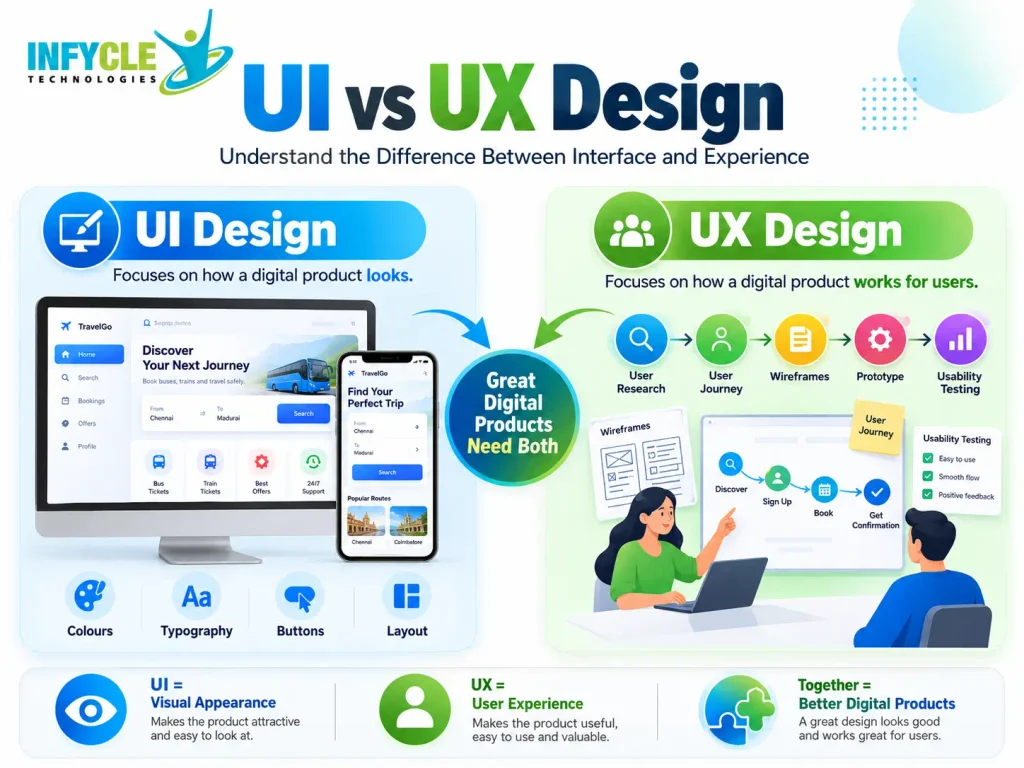
UI vs UX Design is an important topic for anyone interested in website design, mobile app development, and technology careers. Although these terms often appear together, they describe two different parts of the design process. UI focuses on how a digital product looks, while UX focuses on how it works and feels for users.
For example, a shopping app may have attractive colours, buttons, and icons. However, if customers struggle to find products or complete payments, the app has a poor user experience. Therefore, successful digital products need both effective UI and thoughtful UX design.
Furthermore, understanding UI vs UX Design helps students choose the right learning path. Beginners can explore design careers, while aspiring developers can learn how design connects with frontend development. In addition, students interested in a Full Stack Developer course in Chennai can benefit from understanding how designers and developers work together.
Chennai offers learning opportunities for students, fresh graduates, and career changers who want to enter the technology industry. With the right skills, practical projects, and a strong portfolio, beginners can prepare for entry-level roles in UI design, UX design, and web development.
In this guide, you will learn the differences between UI and UX, real-world examples, essential skills, career opportunities, and ways to start your journey.
Table of Contents
- What Is UI Design?
- What Is UX Design?
- What Is the Difference Between UI vs UX Design?
- What Are the Main Elements of UI and UX Design?
- How Does UI vs UX Design Work in Real Life?
- What Skills Do UI and UX Designers Need?
- What Tools Do UI and UX Designers Use?
- What Is the Career Scope of UI vs UX Design?
- How Can Beginners Learn UI and UX Design?
- Self-Learning vs Structured Training
- Frequently Asked Questions
- Conclusion
What Is UI Design?
UI design, or User Interface design, focuses on the visual elements people use to interact with a website, mobile app, or software application. Therefore, UI designers make digital products attractive, clear, and easy to navigate.
For example, when you open a food delivery app, you see buttons, menus, images, colours, and icons. These elements form the user interface.
Moreover, UI designers create consistent layouts so users can understand each screen without confusion.


10
What Are the Main Responsibilities of a UI Designer?
A UI designer focuses on how a digital product looks and how users interact with its visible elements. Specifically, their responsibilities include:
- Visual design: Choosing colours, fonts, icons, and images.
- Layout design: Arranging content, buttons, and menus clearly.
- Responsive design: Ensuring screens work across mobile, tablet, and desktop devices.
- Consistency: Maintaining similar styles across different screens.
- Interactive elements: Designing buttons, forms, menus, and navigation controls.
- Design systems: Creating reusable styles and components for development teams.
Furthermore, UI designers often collaborate with UX designers and developers. As a result, the final product looks professional and works consistently across devices.
What Is an Example of UI Design?
Consider a college website that displays course details and admission information. The UI designer chooses the heading styles, background colours, course cards, and admission buttons.
For instance, a clearly visible green button labelled “Apply Now” helps students identify the next action. Similarly, readable fonts and well-organised sections make the website easier to scan.
What Is UX Design?
UX design, or User Experience design, focuses on the complete experience people have when using a product or service. Therefore, UX designers study user needs, identify problems, and create solutions that make tasks easier.
For example, a student visiting a college website should find course fees, eligibility requirements, and application instructions without unnecessary effort. UX design helps make that journey simple and logical.


7
What Are the Main Responsibilities of a UX Designer?
UX designers focus on user needs, usability, and the steps required to complete a task. Their responsibilities typically include:
- User research: Understanding users through interviews, surveys, and observation.
- User personas: Creating profiles that represent important user groups.
- User journey mapping: Identifying the steps people follow to achieve a goal.
- Information architecture: Organising information into logical sections.
- Wireframing: Planning screen layouts before adding detailed visuals.
- Usability testing: Observing users and identifying problems.
- Prototyping: Creating interactive models to test an idea before development.
Furthermore, UX designers use feedback to improve their designs. Consequently, they can reduce confusion, remove unnecessary steps, and help users complete tasks more easily.
What Is an Example of UX Design?
Imagine a student registering for an online training course. Initially, the student must find the course, check the syllabus, enter personal details, and complete registration.
However, a confusing form with too many steps may cause the student to leave. A UX designer studies this problem and simplifies the registration journey.
As a result, the student can find the course, understand the requirements, and register with fewer difficulties.
What Is the Difference Between UI vs UX Design?
UI design focuses on visual presentation, whereas UX design focuses on the overall user experience. Although both disciplines work together, they solve different problems.
The following comparison explains the key differences between UI vs UX Design.
| Comparison | UI Design | UX Design |
|---|---|---|
| Full form | User Interface | User Experience |
| Main focus | Visual appearance | Usability and user journey |
| Key question | How should it look? | How should it work for users? |
| Main activities | Colours, typography, layouts, icons | Research, user flows, wireframes, testing |
| Common deliverables | Screen designs, design systems, visual components | User journeys, personas, wireframes, usability findings |
| Success measure | Visual consistency and interface clarity | Task completion, usability, and user satisfaction |
| Common tools | Figma, Adobe tools | Figma, research and testing tools |
| Career roles | UI Designer, Visual Designer | UX Designer, UX Researcher |
Which Is More Important: UI or UX Design?
Neither UI nor UX design is universally more important because each solves a different problem. However, the right balance depends on the product and its users.
For instance, a visually attractive banking app may still frustrate customers if transferring money requires too many steps. Likewise, an easy-to-use app may appear unprofessional if its interface lacks visual consistency.
Therefore, businesses need both disciplines to create useful, attractive, and reliable digital products.
What Are the Main Elements of UI and UX Design?
UI elements communicate information visually, while UX elements organise the journey users follow to achieve their goals. Together, these elements help create a smooth digital experience.
What Are the Key Elements of UI Design?
UI design includes the visible and interactive parts of a digital interface. For example, these elements help users recognise information and understand available actions.
- Colour palette: Establishes a consistent visual identity.
- Typography: Makes text readable and creates visual hierarchy.
- Buttons and icons: Help users recognise actions.
- Spacing: Separates content and improves readability.
- Images and graphics: Support the message and attract attention.
- Responsive layouts: Adapt the interface to different screen sizes.
Furthermore, accessibility matters when choosing colours, font sizes, and interaction styles. Therefore, designers should make interfaces usable for people with different needs.
What Are the Key Elements of UX Design?
UX design includes the research, planning, and testing activities that shape a user’s journey. These elements help teams understand problems before investing in full development.
- User research: Identifies user expectations and challenges.
- Personas: Represent the needs of important user groups.
- User flows: Map the steps required to complete a task.
- Wireframes: Show the structure of a page or screen.
- Prototypes: Demonstrate how an interaction may work.
- Usability testing: Reveals confusing or difficult interactions.
In addition, UX designers consider feedback throughout the design process. As a result, they can improve the product based on actual user behaviour rather than assumptions alone.
Mid-Article CTA: Learn Skills That Support Your Tech Career
Interested in building websites and understanding how digital products work? Infycle Technologies in Chennai offers technology training for beginners who want practical skills and career guidance.
Although UI and UX design are specialised disciplines, web development knowledge helps learners understand how interface designs become working websites. Therefore, students exploring a Full Stack Developer course in Chennai can learn about the relationship between frontend interfaces, backend systems, and databases.
- Learn through practical exercises and projects.
- Understand website structure and responsive layouts.
- Build technical foundations for entry-level opportunities.
- Explore suitable learning paths based on your career goals.
Visit Infycle Technologies to explore available courses and training options.
How Does UI vs UX Design Work in Real Life?
UI and UX design work together to solve user problems and deliver a consistent digital experience. Typically, teams research user needs first, plan the journey next, and then refine the visual interface.
Consider an online bus ticket booking website.

Step 1: Understand the user problem
UX designers identify what passengers need, such as searching routes, selecting travel dates, and checking ticket prices. Therefore, they plan a simple booking journey.

Step 2: Create the user flow
Next, designers map the steps from searching for a bus to confirming a booking. Consequently, they can identify unnecessary steps before development begins.

Step 3: Design the interface
UI designers choose colours, buttons, seat indicators, and readable layouts. In addition, they make important actions easy to recognise.

Step 4: Test and improve
Finally, the team observes users completing bookings and fixes confusing elements. As a result, the booking process becomes easier to understand and use.
This example shows why UI vs UX Design is not a competition between two roles. Instead, both disciplines contribute to a better product.
What Skills Do UI and UX Designers Need?
UI designers need visual and interface design skills, while UX designers need research, problem-solving, and usability skills. However, both benefit from communication, collaboration, and an understanding of user needs.
What Skills Should a UI Designer Learn?
Aspiring UI designers should begin with visual design fundamentals. Then, they can practise creating consistent and responsive interfaces.
Important skills include:
- Colour theory and typography.
- Layout, spacing, and visual hierarchy.
- Figma and component-based design.
- Responsive interface design.
- Accessibility fundamentals.
- Basic HTML and CSS knowledge.
Furthermore, a portfolio with website and mobile app designs helps demonstrate practical ability. Therefore, beginners should create sample projects instead of relying only on certificates.
What Skills Should a UX Designer Learn?
UX designers should learn how to understand users and solve practical problems. In addition, they need to explain design decisions clearly.
Important skills include:
- User research and interview techniques.
- User personas and journey mapping.
- Information architecture and user flows.
- Wireframing and prototyping.
- Usability testing and feedback analysis.
- Problem-solving and communication.
For example, a beginner can redesign a college admission website and explain how the new layout helps students find information more easily.
What Tools Do UI and UX Designers Use?
UI and UX designers use digital tools to plan, create, test, and share designs. Although some tools support both disciplines, each tool offers different capabilities.
| Tool | Main purpose |
|---|---|
| Figma | Interface design, collaboration, and prototyping |
| Adobe Photoshop | Image editing and visual assets |
| Adobe Illustrator | Vector graphics and illustrations |
| FigJam | Brainstorming, diagrams, and user flows |
| Miro | Research workshops and journey mapping |
| Maze | Usability testing and prototype feedback |
Figma is a useful starting point for beginners because it supports interface design and interactive prototypes. Meanwhile, research and testing tools help UX designers evaluate how people use their designs.
Therefore, start with one primary design tool and build confidence through regular practice before exploring additional software.
What Is the Career Scope of UI vs UX Design?
UI and UX design offer career opportunities across software companies, digital agencies, startups, e-commerce businesses, and product teams. Furthermore, businesses need people who can improve their websites, mobile apps, and digital services.
What Career Roles Can You Choose in UI vs UX Design?
Your career options depend on your interests, skills, portfolio, and experience. For example, visual design enthusiasts may prefer UI roles, while people who enjoy research and problem-solving may prefer UX roles.

1. UI Designer
Creates website and app interfaces, visual components, and design systems. This role suits people who enjoy colours, typography, layouts, and visual details.

2. UX Designer
Studies user behaviour, maps journeys, and improves usability. This role suits people who enjoy research, logical thinking, and solving user problems.

3. Product Designer
Combines UI, UX, and product thinking to improve digital products. Moreover, product designers often collaborate with developers, researchers, and product managers.

4. Frontend Developer
Converts interface designs into functional websites using HTML, CSS, JavaScript, and frameworks. Therefore, this role suits people who prefer coding alongside visual problem-solving.
What Is the Difference Between UI vs UX Design Salaries?
UI and UX salaries vary by company, location, experience, and technical ability. Generally, employers assess a candidate’s practical skills, portfolio, and ability to solve real problems rather than relying only on qualifications.
In Chennai, beginners should research current job postings to understand salary ranges for UI Designer, UX Designer, and Product Designer roles. Furthermore, internships and practical projects can help candidates demonstrate their skills and compete for suitable opportunities.
Is UI or UX Design Better for Beginners?
Both are suitable for beginners, although your interests can help you choose the right starting point. If you enjoy colours, layouts, and visual creativity, begin with UI design.
On the other hand, if you enjoy understanding people, researching problems, and improving processes, UX design may suit you better. Nevertheless, learning the basics of both disciplines gives you a broader understanding of product design.
How Can Beginners Learn UI vs UX Design?
Beginners can learn UI and UX design through structured lessons, regular practice, feedback, and portfolio projects. Therefore, a step-by-step learning plan is more useful than trying to master every tool immediately.
Follow these steps to get started:
- Understand the fundamentals. First, learn the difference between UI, UX, usability, and accessibility.
- Choose a design tool. Next, practise basic layouts, typography, colours, and reusable components in Figma.
- Study existing websites. For example, analyse a shopping website or booking app and identify what works well.
- Create wireframes. Then, plan the structure of a website or app before adding detailed visual styles.
- Build a prototype. Connect screens and demonstrate how users move through the product.
- Test your design. Ask other people to complete a task and observe where they experience difficulties.
- Build a portfolio. Finally, present your projects, design decisions, and improvements in a clear case study.
For instance, redesigning a local business website can help you practise navigation, responsive layouts, and user flows. Additionally, explaining the problems you solved makes your portfolio more valuable to potential employers.
How Does Full Stack Development Connect With UI vs UX Design?
Full Stack Development focuses on building both the frontend and backend of an application, whereas UI and UX design focus on its interface and user experience. However, these skills complement each other during product development.
For example, a UI designer creates the booking screen, a UX designer plans the passenger journey, and a Full Stack Developer connects the interface to APIs and databases.
Therefore, students who want to build complete web applications can consider a Full Stack Developer course in Chennai alongside their design fundamentals. This combination can help them understand the complete process, from planning a user-friendly interface to implementing functional features.
Self-Learning vs Structured Training: Which Is Better?
Self-learning offers flexibility and low cost, while structured training provides a planned curriculum, guided practice, and opportunities for feedback. However, the better option depends on your learning style, available time, and career goals.
| Factor | Self-Learning | Structured Training |
|---|---|---|
| Learning schedule | Flexible | Usually follows a planned schedule |
| Cost | Can be low or free | Usually involves a course fee |
| Guidance | Must find your own resources | Trainer guidance may be available |
| Feedback | Depends on external communities | May include trainer or peer reviews |
| Practical projects | Self-managed | May follow guided project work |
| Progress tracking | Requires self-discipline | May include milestones and assessments |
| Career preparation | Requires independent planning | May include portfolio or interview support |
For example, motivated learners can start with free tutorials and practise Figma independently. However, beginners who need regular guidance may benefit from structured classes and project reviews.
If you are comparing options, look for practical assignments, trainer experience, portfolio support, and transparent course details. In addition, ask about demo classes before choosing a training institute.
How Can You Choose a Training Institute in Chennai?
The right institute should match your career goal, budget, schedule, and preferred learning style. Therefore, compare more than advertisements or placement claims before enrolling.
When evaluating a training provider, check:
- Whether the syllabus covers relevant skills and current tools.
- Whether students complete practical projects.
- Whether trainers explain concepts clearly.
- Whether the course supports portfolio development.
- Whether placement assistance and eligibility conditions are clearly explained.
- Whether the institute offers a demo class.
For learners interested in web development, Full Stack Developer training in Chennai can provide a route into frontend and backend development. Meanwhile, learners focused on visual problem-solving should also explore dedicated UI/UX design courses.
Infycle Technologies is one option to explore when comparing software training providers. Review its available courses and learning support to determine whether they match your goals.
Frequently Asked Questions About UI vs UX Design
1. What is the main difference between UI vs UX Design?
UI design focuses on a product’s appearance, including colours, typography, buttons, and layouts. In contrast, UX design focuses on usability, user needs, and task completion. Therefore, both disciplines work together to create attractive and easy-to-use digital products.
2. Can beginners learn UI and UX design without coding?
Yes, beginners can learn UI and UX design without coding experience. Initially, focus on design principles, Figma, wireframes, and prototyping. However, basic HTML and CSS knowledge can help you collaborate with developers and understand how interface designs become functional websites.
3. Which tool should beginners learn first for UI vs UX Design?
Figma is a practical starting point for learning UI vs UX Design because it supports interface layouts, wireframes, reusable components, and interactive prototypes. Furthermore, beginners can practise complete projects with one tool before exploring specialised research and testing software.
4. What qualifications do UI and UX designers need?
Many employers value practical design skills, a strong portfolio, and problem-solving ability. Although some positions prefer relevant degrees, requirements vary by company. Therefore, beginners should develop project experience, learn design tools, and demonstrate their decisions through clear portfolio case studies.
5. Can I learn UI/UX design alongside Full Stack Development?
Yes, you can learn UI/UX design alongside Full Stack Development. First, understand interface design and user flows. Then, learn HTML, CSS, JavaScript, and backend fundamentals. As a result, you can understand both the design process and the technical implementation of web applications.
Conclusion:
UI vs UX Design represents two complementary skills that help businesses create better digital products. UI design improves visual presentation, while UX design makes products easier and more enjoyable to use. Therefore, understanding both disciplines helps beginners explore suitable career paths.
If you enjoy visual creativity, start with UI design. Alternatively, choose UX design if you prefer research, usability, and problem-solving. Furthermore, building practical projects and a strong portfolio can help you demonstrate your skills to potential employers.
For students interested in developing complete web applications, a Full Stack Developer course in Chennai can provide a foundation in frontend and backend technologies. Combining development knowledge with UI/UX fundamentals can also help you understand how digital products move from an initial idea to a working application.