SQL vs PL/SQL: What’s the Difference and Which Should You Learn First?
Introduction
Choosing between SQL and PL/SQL is one of the first questions many beginners ask when starting a career in database development. If you are planning to work with Oracle databases, understanding the SQL vs PL/SQL comparison will help you build the right foundation and avoid confusion later.
Whether you are a college student, a fresh graduate, or someone switching careers, learning database skills can open doors to opportunities in software development, database administration, data analytics, and enterprise application development. Many companies rely on Oracle databases to manage business-critical information, making SQL and PL/SQL valuable skills in today’s job market.
If you’re planning to join the Best Oracle PLSQL Training In Chennai or looking for Oracle Training in Chennai, knowing the difference between SQL and PL/SQL will help you choose the right learning path. In this guide, you’ll learn what SQL and PL/SQL are, how they differ, when to learn each one, and how they fit into real-world careers.
Table of Contents
- What is SQL?
- What is PL/SQL?
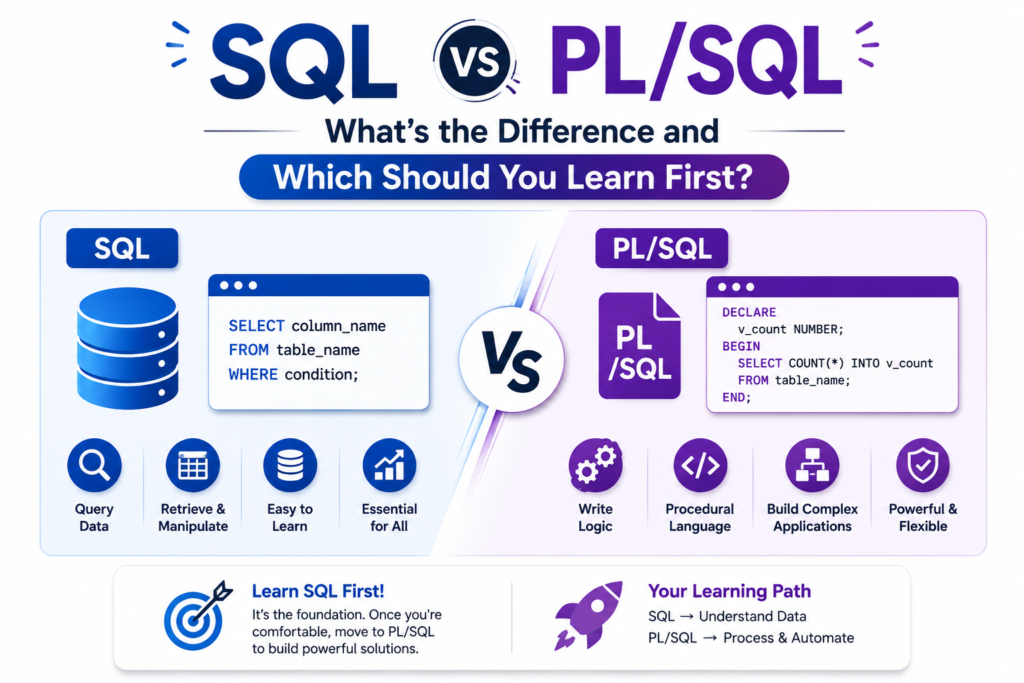
- SQL vs PL/SQL: Key Differences
- SQL vs PL/SQL Comparison Table
- When Should You Learn SQL First?
- Why Learning PL/SQL Matters
- Real-World Example
- Mid-Article Learning Tip
What is SQL?
SQL (Structured Query Language) is the standard language used to communicate with relational databases. It allows users to create, read, update, and delete data stored in tables.
Almost every business application uses SQL in some way. Whether you’re viewing customer details in a banking application or checking inventory in an online shopping platform, SQL works behind the scenes.
Common SQL Operations
- Retrieve data using SELECT
- Insert records using INSERT
- Update existing information using UPDATE
- Delete records using DELETE
- Create database objects like tables and views
- Manage permissions and users
Example
SELECT employee_name, salary
FROM employees
WHERE department = 'HR';
This query retrieves employee details from the HR department.
SQL is easy to learn because it focuses on retrieving and managing data rather than writing complete programs.
What is PL/SQL?
PL/SQL stands for Procedural Language extensions to SQL. It is Oracle’s programming language built on top of SQL.
While SQL can only execute one statement at a time, PL/SQL allows developers to combine multiple SQL statements into programs that include variables, loops, conditions, functions, and exception handling.
PL/SQL is mainly used for:
- Business logic
- Stored procedures
- Functions
- Packages
- Database triggers
- Automated data validation
Instead of sending many SQL queries separately, PL/SQL processes them together, improving performance and reducing network traffic.
Example
BEGIN
UPDATE employees
SET salary = salary + 5000
WHERE department = 'HR';

COMMIT;
END;
This block updates salaries and saves the changes as one transaction.
SQL vs PL/SQL: Understanding the Core Difference
The biggest difference between SQL vs PL/SQL is their purpose.
SQL is designed to interact with data.
PL/SQL is designed to build complete database applications using SQL along with programming features.
Think of SQL as asking questions to a database.
Think of PL/SQL as writing a complete program that can ask many questions, process results, make decisions, and handle errors automatically.
SQL vs PL/SQL Comparison Table
| Feature | SQL | PL/SQL |
|---|---|---|
| Type | Query Language | Procedural Programming Language |
| Developed By | ANSI Standard | Oracle Corporation |
| Purpose | Manage Data | Build Database Programs |
| Supports Variables | No | Yes |
| Loops | No | Yes |
| Conditional Statements | No | Yes |
| Exception Handling | No | Yes |
| Stored Procedures | No | Yes |
| Execution | One Statement at a Time | Block of Statements |
| Best For | Data Retrieval | Business Logic |
This comparison shows why SQL is considered the starting point, while PL/SQL is the next step for Oracle developers.
Should You Learn SQL Before PL/SQL?
Yes.
Learning SQL first makes understanding PL/SQL much easier.
Here’s a simple learning order:
Step 1
Learn database basics
- Tables
- Rows
- Columns
- Primary Keys
- Foreign Keys
Step 2
Master SQL
- SELECT
- WHERE
- ORDER BY
- GROUP BY
- JOIN
- Aggregate Functions
- Views
Step 3
Move to PL/SQL
- Variables
- Loops
- IF Statements
- Cursors
- Procedures
- Functions
- Packages
- Triggers
- Exception Handling
Trying to learn PL/SQL without SQL is like learning advanced mathematics before understanding basic arithmetic.
Why Learning PL/SQL Matters
Many Oracle-based companies use PL/SQL to automate business processes.
Examples include:
- Banking applications
- Insurance systems
- ERP software
- Hospital management systems
- Retail billing software
- Government databases
PL/SQL helps developers:
- Reduce repetitive work
- Improve database performance
- Build secure applications
- Process millions of records efficiently
- Implement complex business rules
For Oracle developers, PL/SQL is often a mandatory skill.
Real-World Example
Imagine an online shopping website.
When a customer places an order:
SQL can insert the order into the database.
PL/SQL can perform multiple tasks automatically:
- Verify stock availability
- Calculate discounts
- Generate invoice numbers
- Update inventory
- Process payment status
- Send confirmation details
- Handle errors if payment fails
This is why enterprises rely heavily on PL/SQL instead of using only SQL.
Continue Learning with Practical Projects
Understanding concepts is only the first step. The fastest way to master SQL and PL/SQL is by working on real-world projects such as employee management systems, banking applications, inventory management, and payroll systems. Practical experience helps you write better queries, understand business logic, and prepare for technical interviews. If you’re considering the Best Oracle PLSQL Training In Chennai, choose a course that includes hands-on labs, live projects, and interview preparation rather than only theory.
SQL vs PL/SQL in Real-World Projects
Learning the theory behind SQL and PL/SQL is important, but understanding how they work together in real projects makes the concepts much easier to remember.
In most enterprise applications, SQL and PL/SQL are not competitors—they complement each other. SQL retrieves and manages data, while PL/SQL automates complex processes and business rules.
Here are some examples:
| Industry | SQL Usage | PL/SQL Usage |
|---|---|---|
| Banking | Retrieve customer accounts | Process loan approvals and transactions |
| Healthcare | View patient records | Generate medical reports and billing |
| E-commerce | Display products | Process orders and update inventory |
| Education | Fetch student details | Calculate grades and generate results |
| Human Resources | Retrieve employee data | Automate payroll and leave management |
This is why companies hiring Oracle professionals expect candidates to understand both SQL and PL/SQL.
SQL vs PL/SQL: Which One Should You Learn First?
If you’re new to databases, start with SQL.
SQL teaches you how databases store, organize, and retrieve information. Once you’re comfortable writing queries, learning PL/SQL becomes much easier because it builds directly on SQL concepts.
Recommended Learning Path
Step 1 – Database Fundamentals
Understand:
- Tables
- Rows and Columns
- Data Types
- Primary Keys
- Foreign Keys
- Relationships
Step 2 – Master SQL
Focus on:
- SELECT statements
- WHERE clause
- ORDER BY
- GROUP BY
- HAVING
- JOINS
- Aggregate Functions
- Subqueries
- Views
- Indexes
Step 3 – Learn Oracle PL/SQL
Once SQL becomes comfortable, move to:
- Variables
- Operators
- IF ELSE statements
- Loops
- Cursors
- Stored Procedures
- Functions
- Packages
- Triggers
- Exception Handling
- Collections
Following this order helps beginners avoid confusion and develop stronger programming skills.
Career Opportunities After Learning SQL and PL/SQL
SQL is one of the most requested technical skills across industries. Adding PL/SQL makes your profile even stronger, especially for Oracle-based organizations.
Some common job roles include:
- SQL Developer
- Oracle PL/SQL Developer
- Database Developer
- Database Administrator (DBA)
- Business Intelligence Developer
- Data Analyst
- ETL Developer
- Application Support Engineer
- ERP Technical Consultant
Many sectors actively hire professionals with Oracle database skills, including banking, healthcare, insurance, manufacturing, telecommunications, retail, logistics, and government organizations.
Students completing Oracle Training in Chennai often prepare for these entry-level and mid-level positions through project-based learning and interview practice.
Skills Employers Look For
Recruiters don’t just test SQL syntax. They look for practical problem-solving skills.
Some valuable technical skills include:
- Writing optimized SQL queries
- Understanding database normalization
- Creating joins and subqueries
- Developing stored procedures
- Using cursors efficiently
- Writing triggers
- Exception handling
- Performance tuning basics
- Database security concepts
- Oracle database architecture
In addition to technical knowledge, employers also value communication, logical thinking, debugging skills, and teamwork.
SQL vs PL/SQL Salary and Career Growth
Salary depends on your location, experience, company, and technical expertise. Professionals with practical project experience and Oracle certifications often have better career opportunities.
Entry-Level
- Junior SQL Developer
- Oracle Support Engineer
- Database Support Executive
Mid-Level
- Oracle PL/SQL Developer
- Database Programmer
- ETL Developer
Senior-Level
- Senior Oracle Developer
- Oracle Database Administrator
- Database Architect
- Technical Lead
- Solution Architect
As you gain experience, learning related technologies such as Oracle Forms, Oracle APEX, SQL Performance Tuning, Oracle Cloud, and Data Warehousing can further improve your career prospects.
Common Mistakes Beginners Make
Many learners slow down their progress by making avoidable mistakes.
1. Skipping SQL Basics
Some students jump directly into PL/SQL without understanding SQL. This makes programming much more difficult.
2. Memorizing Queries
Instead of understanding why a query works, beginners often memorize syntax. Focus on concepts first.
3. Ignoring Database Design
Poor table design leads to inefficient queries and performance issues.
4. Not Practicing Enough
Reading tutorials alone isn’t enough. Daily practice helps improve confidence and speed.
5. Avoiding Error Messages
Errors are part of learning. Understanding Oracle error messages helps you become a better developer.
Best Practices for Learning SQL and PL/SQL
If your goal is to become job-ready, follow these proven practices:
- Practice SQL queries every day.
- Build mini database projects.
- Learn how to optimize queries.
- Write clean and readable code.
- Understand business scenarios instead of memorizing syntax.
- Explore Oracle documentation regularly.
- Participate in coding challenges.
- Practice interview questions.
- Work with large datasets to understand performance.
Consistency is more valuable than studying for long hours once a week.
Pros and Cons of SQL and PL/SQL
| SQL | PL/SQL |
|---|---|
| Easy for beginners | Requires SQL knowledge first |
| Standard across databases | Mainly used with Oracle databases |
| Excellent for data retrieval | Excellent for automation and business logic |
| Quick to learn | Takes more time to master |
| Widely used in analytics | Widely used in enterprise applications |
Rather than choosing one over the other, the best approach is to learn SQL first and then build on that knowledge with PL/SQL.
Ready to Advance Your Oracle Skills?
Once you’re confident with SQL, the next step is to practice PL/SQL using real business scenarios. Build projects like banking systems, payroll applications, inventory management, or student management systems. These projects strengthen your understanding of stored procedures, triggers, functions, and exception handling while helping you prepare for technical interviews. If you’re looking for the Best software training institute in chennai, choose a training program that emphasizes hands-on projects, Oracle certification guidance, and placement support.
Frequently Asked Questions (FAQs)
1. What is the main difference between SQL and PL/SQL?
Short Answer: SQL is used to manage and retrieve data, while PL/SQL is used to write programs that automate database tasks.
SQL executes individual queries such as retrieving or updating records. PL/SQL extends SQL by adding programming features like variables, loops, conditions, procedures, and exception handling. Together, they help developers build efficient Oracle database applications.
2. Should beginners learn SQL or PL/SQL first?
Short Answer: Start with SQL before learning PL/SQL.
SQL teaches the fundamentals of relational databases, including tables, queries, joins, and data manipulation. Once you understand these concepts, learning PL/SQL becomes much easier because it uses SQL as its foundation.
3. Is PL/SQL only used with Oracle databases?
Short Answer: Yes. PL/SQL is Oracle’s procedural programming language.
While SQL is a standard language supported by many database systems such as MySQL, PostgreSQL, SQL Server, and Oracle, PL/SQL is specifically designed for Oracle Database. If you plan to work with Oracle applications, PL/SQL is an essential skill.
4. Do I need programming knowledge before learning PL/SQL?
Short Answer: No. Basic SQL knowledge is enough to get started.
Although programming concepts like variables, loops, and conditions are used in PL/SQL, most beginners can learn them gradually through hands-on practice. Regular coding exercises and small projects make the learning process much easier.
5. What jobs can I get after learning SQL and PL/SQL?
Short Answer: You can apply for roles such as SQL Developer, Oracle PL/SQL Developer, Database Developer, or Database Administrator.
These skills are widely used in industries like banking, healthcare, retail, insurance, telecommunications, and enterprise software development. Building practical projects and earning Oracle certifications can further improve your job opportunities.
Conclusion
Understanding the SQL vs PL/SQL comparison is the first step toward building a successful career in database development. SQL helps you manage and retrieve data efficiently, while PL/SQL enables you to automate business processes and create powerful Oracle database applications.
For beginners, the recommended learning path is simple: start with SQL, master database fundamentals, and then move on to PL/SQL. This approach builds a strong foundation and prepares you for real-world development tasks and technical interviews.
If you’re looking to gain practical experience through live projects, expert guidance, and placement-focused learning, enrolling in the Best Oracle PLSQL Training In Chennai or a comprehensive Oracle Training in Chennai program can help you develop industry-ready skills. Choosing the Best software training institute in chennai ensures you receive hands-on training, certification support, and the confidence to begin your Oracle career.
Start Your Oracle Career with Confidence
Whether you’re a student, fresher, career changer, or working professional, learning SQL and PL/SQL can open doors to exciting opportunities in database development and enterprise software.
At Infycle Technologies, our Oracle training programs focus on practical learning through real-time projects, interview preparation, and expert mentoring. From SQL fundamentals to advanced PL/SQL programming, you’ll gain the skills employers expect from Oracle professionals.
Take the next step today and build a strong foundation for a successful career in Oracle database technologies.