Compilation and Execution of a Java Program
Introduction
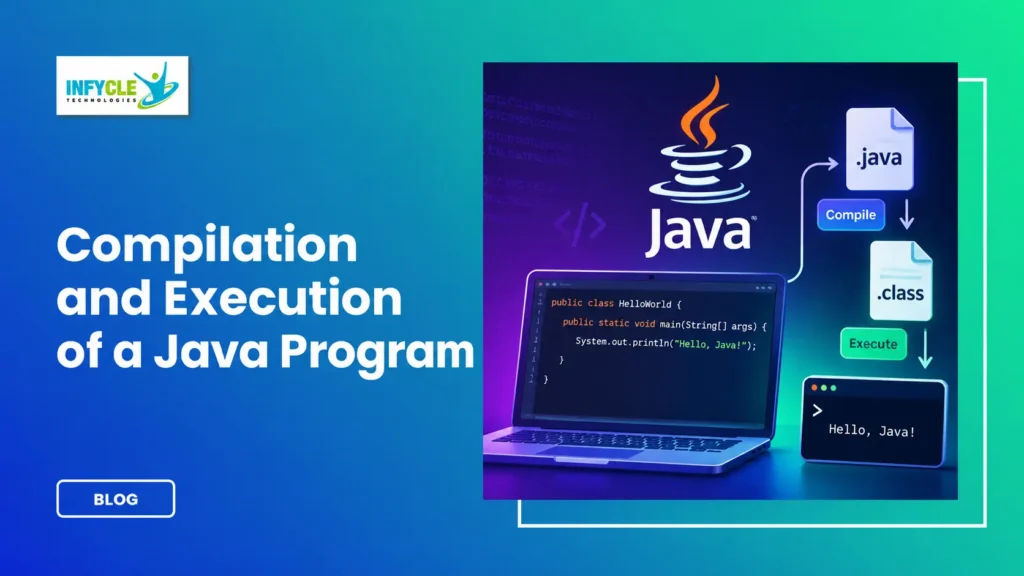
A Java Program follows a clear process from source code to final output. First, a developer writes Java source code in a .java file. Next, the Java compiler converts that source code into bytecode. Then, the Java Virtual Machine (JVM) executes the bytecode.
Understanding this process is essential for every beginner learning Java. Moreover, it helps students understand what happens behind the scenes when they run their first program. For instance, a simple Hello World program passes through several stages before displaying output.
Therefore, learning compilation and execution provides a strong foundation for Java development. It also makes debugging easier because learners can identify whether an issue occurs during compilation or execution.
For students and fresh graduates in Chennai, this knowledge can support practical learning in java training in chennai programs. Furthermore, understanding these fundamentals prepares learners for advanced topics such as OOP, collections, JDBC, Spring Boot, and application development.
Table of Contents
- What Is a Java Program?
- How Does a Java Program Work?
- What Happens During Java Program Compilation?
- What Is Java Bytecode?
- How Does JVM Execute a Java Program?
- What Tools Are Required to Compile Java Programs?
- How to Compile and Execute a Java Program?
- What Is the Difference Between Compilation and Execution?
- Common Errors While Running a Java Program
- Self-Learning vs Structured Java Training
- Why Choose Java Training in Chennai?
- Frequently Asked Questions
- Conclusion
What Is a Java Program?
A Java Program is a set of instructions written using Java syntax to perform a specific task. These instructions are stored in a source file with the .java extension.
For example, beginners can start with a simple program:
class HelloWorld {
    public static void main(String[] args) {
        System.out.println("Hello World");
    }
}
Here, the main() method acts as the starting point of the program. Therefore, the JVM looks for this method when it starts execution.
Moreover, System.out.println() displays the specified message on the screen. As a result, beginners can immediately understand the connection between code and output.
How Does a Java Program Work?
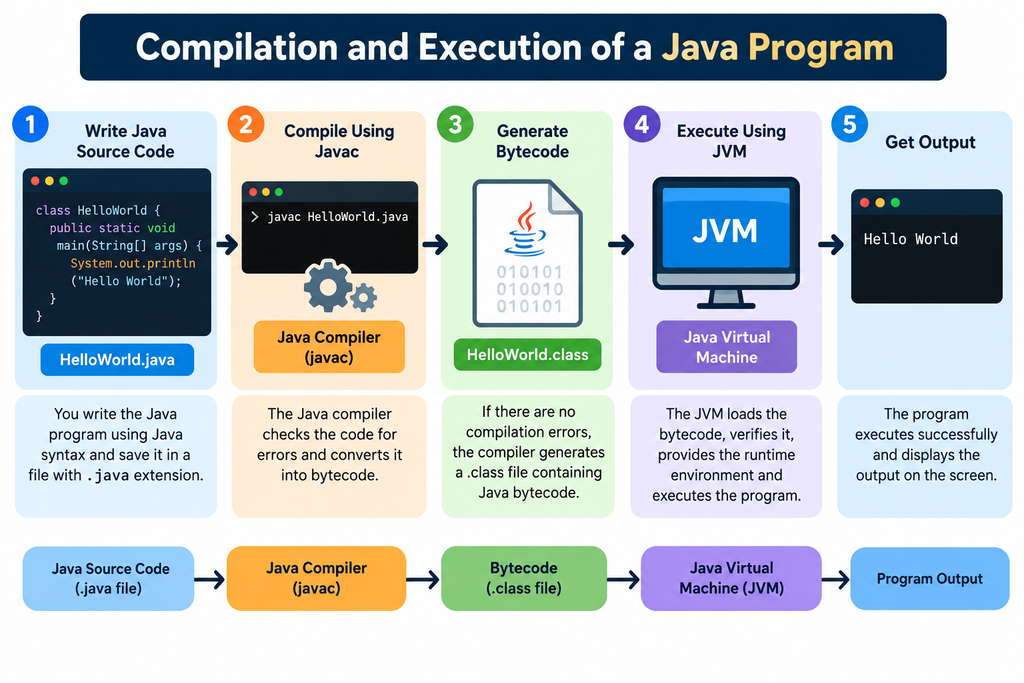
A Java Program works through several important stages, including writing, compiling, loading, and execution. Therefore, understanding these stages makes Java easier to learn.
The basic flow looks like this:
Java Source Code → Java Compiler → Bytecode → JVM → Machine-Level Execution → Output
First, the developer writes source code. Next, the javac compiler checks and compiles the code.
After that, the compiler creates a .class file containing bytecode. Then, the JVM loads and executes that bytecode.
Consequently, the user receives the final output from the program.
What Are the Main Stages of a Java Program?
The main stages are:
- Writing source code
- Saving the
.javafile - Compiling the source code
- Generating bytecode
- Loading bytecode into the JVM
- Executing the bytecode
- Displaying the output
Each stage has a specific purpose. Therefore, beginners should understand the complete flow rather than memorizing commands alone.
What Happens During Java Program Compilation?
A Java Program is compiled when the Java compiler converts source code into bytecode. The compiler is commonly called javac.
Suppose the file name is:
HelloWorld.javaYou can compile it using:
javac HelloWorld.javaIf the source code contains no compilation errors, Java creates:
HelloWorld.classThe .class file contains Java bytecode. However, it does not contain traditional machine code for one specific operating system.
Instead, the bytecode is designed for the JVM. Therefore, the same compiled bytecode can run on different systems that support a suitable Java environment.
Why Is Compilation Important?
Compilation helps identify many coding problems before execution. For example, the compiler can detect syntax errors, incorrect declarations, and incompatible data types.
Furthermore, early error detection saves development time. As a result, developers can correct problems before running the application.
What Is Java Bytecode?
Java bytecode is an intermediate form of instructions generated by the Java compiler. It is stored inside a .class file.
For example:
HelloWorld.java
       ↓
    javac
       ↓
HelloWorld.class
       ↓
   Bytecode
The bytecode does not directly depend on Windows, Linux, or macOS. Instead, the JVM provides the environment required to execute it.
Therefore, Java follows the popular idea of “Write Once, Run Anywhere.”
However, the operating system still needs a compatible Java Runtime Environment. Thus, Java achieves portability through the JVM layer.
How Does JVM Execute a Java Program?
The JVM executes Java bytecode and manages the runtime environment. Therefore, it plays a central role between compiled Java code and the computer.
When you run:
java HelloWorldthe JVM starts the program.
First, the JVM loads the required class. Next, it checks the bytecode. Then, it prepares the runtime environment.
After that, the JVM begins execution from:
public static void main(String[] args)Furthermore, modern JVMs can use Just-In-Time compilation to improve execution performance.
What Is the Role of the JVM?
The JVM performs several important tasks:
- Loads Java classes
- Verifies bytecode
- Manages memory
- Executes bytecode
- Supports garbage collection
- Handles runtime exceptions
- Provides platform independence
As a result, the JVM is one of the most important components in Java development.
What Tools Are Required to Compile Java Programs?
To compile and execute a Java Program, beginners normally need the Java Development Kit, a code editor, and a terminal or command prompt.
The main tool is the JDK, or Java Development Kit. It provides the Java compiler and other development utilities.
For example, after installing Java, you can check the version with:
java -versionYou can also check the compiler using:
javac -versionIf both commands work, your Java environment is generally ready for basic development.
Moreover, beginners can use editors such as VS Code, IntelliJ IDEA, or Eclipse. However, learning terminal commands first can improve their understanding of compilation and execution.
How to Compile and Execute a Java Program?
A Java Program can be compiled and executed using two simple terminal commands. First, compile the source file. Next, run the generated class.
Step 1: Create the Java Program
Create a file called:
HelloWorld.javaAdd the following code:
class HelloWorld {
    public static void main(String[] args) {
        System.out.println("Welcome to Java");
    }
}
Step 2: Open the Terminal
Navigate to the folder containing your Java file.
For example:
cd DesktopThe exact command depends on where you saved the file.
Step 3: Compile the Java Program
Run:
javac HelloWorld.javaIf the code is correct, Java generates:
HelloWorld.classStep 4: Execute the Program
Now run:
java HelloWorldNotice that you do not write .class after the class name.
The output will be:
Welcome to JavaTherefore, the complete process is:
Write Code
   ↓
Save .java File
   ↓
Compile Using javac
   ↓
Generate .class File
   ↓
Run Using java
   ↓
Get Output
What Is the Difference Between Compilation and Execution?
Compilation converts Java source code into bytecode, while execution runs that bytecode through the JVM. Therefore, both stages perform different jobs.
| Feature | Compilation | Execution |
|---|---|---|
| Main tool | javac | java / JVM |
| Input | .java file | .class file |
| Output | Bytecode | Program output |
| Main purpose | Check and translate code | Run the program |
| Common errors | Syntax and type errors | Runtime errors |
| Stage | Before execution | During runtime |
For example, a missing semicolon can cause a compilation error. However, dividing a number by zero can cause a runtime problem.
Consequently, developers should understand both stages when debugging Java applications.
What Errors Can Occur in a Java Program?
A Java Program can produce different types of errors depending on the stage where the problem occurs. Therefore, identifying the error type is important for faster debugging.
1. Compilation Errors
Compilation errors occur when the compiler cannot understand or validate the source code.
For example:
System.out.println("Hello")The missing semicolon can cause a compilation error.
Therefore, check the compiler message carefully and correct the reported line.
2. Runtime Errors
Runtime errors occur after successful compilation.
For example:
int result = 10 / 0;This can produce an ArithmeticException.
However, the program may compile successfully because the syntax itself is valid.
3. Logical Errors
Logical errors occur when the program runs but produces an incorrect result.
For instance, an incorrect formula may produce the wrong salary calculation. Therefore, testing and debugging are important parts of Java development.
Why Choose Java Training in Chennai?
Java training in Chennai can help beginners build practical programming skills through structured learning, coding exercises, and guided projects.
First, students can learn Java fundamentals step by step. Next, they can practice OOP concepts, collections, exception handling, SQL, and database connectivity.
Furthermore, structured training can provide regular assignments and mentor support. As a result, learners can move from basic syntax to application development more confidently.
For college students and fresh graduates, practical training can also provide exposure to real development workflows.
How Can a Java Course in Chennai Support Beginners?
A Java Course in Chennai can provide a structured learning path from programming fundamentals to practical development.
For example, a beginner-friendly curriculum can cover:
- Java fundamentals
- Variables and data types
- Operators
- Conditional statements
- Loops
- Arrays
- Methods
- OOP concepts
- Exception handling
- Collections
- JDBC
- SQL and MySQL
- Git and GitHub
- REST API fundamentals
- Spring Boot basics
- Mini projects
Therefore, learners can develop skills in a logical sequence rather than studying unrelated topics.
What Should Beginners Practice After Learning Compilation?
Beginners should immediately practice writing, compiling, running, and debugging small Java programs. This approach helps convert theoretical knowledge into practical programming ability.
Start with simple programs such as:
Hello World
Addition of two numbers
Even or odd number
Largest of three numbers
Factorial calculation
Palindrome checking
Prime number checking
Array operations
Student marks calculation
Simple banking application
Next, increase the difficulty gradually.
For example, after learning methods, create reusable functions. Then, after learning classes and objects, build a small student management application.
Furthermore, use Git to save your projects. This creates a basic development portfolio that can support your job search.
Self-Learning vs Structured Java Training
Both approaches can work; however, structured training often provides a clearer learning path for beginners.
| Factor | Self-Learning | Structured Training |
|---|---|---|
| Learning path | Learner decides | Mentor-guided |
| Doubt clearing | Online resources | Trainer support |
| Practice | Self-managed | Guided exercises |
| Projects | Optional | Usually structured |
| Consistency | Depends on learner | Regular schedule |
| Feedback | Limited | Mentor feedback |
| Career guidance | Self-researched | Can include guidance |
| Suitable for beginners | Possible | Often easier |
Therefore, learners should choose based on their learning style, available time, and career goals.
What Should You Look for in Java Training?
A good Java training program should combine concepts, coding practice, projects, and career-oriented skills. Therefore, do not evaluate a course only by its duration.
Look for:
- Experienced trainers
- Practical coding sessions
- Regular assignments
- Project development
- Database practice
- Debugging exercises
- Git and GitHub exposure
- Interview preparation
- Resume guidance
- Placement-oriented support
Moreover, ask whether the course includes hands-on programming. Practical experience is particularly important because employers expect candidates to apply concepts.
Frequently Asked Questions
What Is a Java Program and How Does It Run?
A Java program is compiled to bytecode by the Java compiler, javac. Then, the Java Virtual Machine reads that bytecode and executes it. Therefore, Java uses compilation and runtime execution together, which supports portability across operating systems and hardware platforms.
How Do I Compile and Run a Java Program?
To run a Java program, install the Java Development Kit, create a source file with a .java extension, compile it using javac, and run the generated class with the java command. Finally, check the output in your terminal window successfully.
Why Does Java Use Bytecode?
Java source code is converted into bytecode during compilation. Next, the Java Virtual Machine loads and verifies that bytecode. Then, the JVM interprets or compiles it at runtime. Therefore, the same bytecode can run across supported platforms reliably and consistently.
What Does the Java Compiler Do?
The Java compiler checks syntax, types, declarations, and other language rules before producing bytecode. However, it does not execute the program. Instead, the JVM handles runtime execution, while the compiler helps catch many coding errors before actual program execution begins.
Is Java Suitable for Beginners?
Yes, beginners can learn Java effectively through structured practice. First, learn syntax and programming basics. Next, write small Java programs. Then, practice compilation, debugging, and execution. With guidance and regular exercises, beginners can build practical coding confidence steadily over time.
Learn Java with Infycle Technologies
Want to move beyond basic Java syntax and build practical development skills?
Infycle Technologies provides career-focused technical training for students, fresh graduates, and beginners. Furthermore, learners can strengthen their programming fundamentals through practical exercises and project-based learning.
With the right guidance, you can progress from your first Java Program to object-oriented programming, database connectivity, and application development.
Start learning Java with practical guidance and build skills for your IT career.
Conclusion
Understanding the Compilation and Execution of a Java Program is one of the first important steps in learning Java. First, you write source code in a .java file. Next, the javac compiler converts it into bytecode. Finally, the JVM loads and executes that bytecode.
Therefore, beginners should practice this complete process instead of only memorizing Java syntax.
For students, graduates, and career changers in Chennai, java training in chennai can provide a structured path toward practical programming skills. Moreover, consistent practice can help learners progress from simple programs to real-world Java applications.
If you are searching for a practical Java Course in Chennai, focus on training that includes coding practice, projects, debugging, databases, and career preparation.