Java Data Types Explained: Types, Examples and Usage
Java Data Types are the foundation of Java programming because they define what kind of values a variable can store. Whether you are learning Java for the first time or preparing for a developer interview, understanding Java Data Types is essential.
Java is a popular programming language used to build web applications, enterprise software, Android applications, and backend systems. Therefore, every Java developer must understand how data works before writing complex programs.
For example, a program may store a student’s name, age, marks, and attendance percentage. However, each value requires a suitable data type. Java provides different data types to handle numbers, characters, decimal values, and logical conditions.
Furthermore, Java Data Types help developers manage memory and write reliable code. They also make programs easier to understand and maintain.
If you are a beginner looking for Java training in Chennai, learning data types is an excellent starting point. In this guide, you will understand the different types, practical examples, common mistakes, and their real-world usage.
Table of Contents
- What Are Java Data Types?
- What Are the Different Types of Java Data Types?
- What Are Primitive Data Types in Java?
- What Are Non-Primitive Data Types in Java?
- What Is the Difference Between Primitive and Non-Primitive Data Types?
- How Do You Declare Variables in Java?
- Java Data Types with Practical Examples
- How Do You Choose the Right Java Data Type?
- What Are Common Mistakes When Using Java Data Types?
- Self-Learning vs Structured Java Training
- Frequently Asked Questions
- Conclusion
What Are Java Data Types?
Java Data Types define the type of value that a variable can store. They tell the compiler how much memory a value needs and what operations it supports.
For example, consider this Java statement:
int age = 25;Here:
intrepresents the data type.agerepresents the variable name.25represents the stored value.
Therefore, Java understands that the age variable stores an integer.
Similarly, you can store different types of information using different data types.
String name = "Karthick";
int age = 25;
double salary = 25000.50;
char grade = 'A';
boolean isActive = true;
In this example, each variable stores a different kind of information.
Furthermore, Java is a strongly typed programming language. This means you must declare a suitable data type when creating a variable.
What Are the Different Types of Java Data Types?
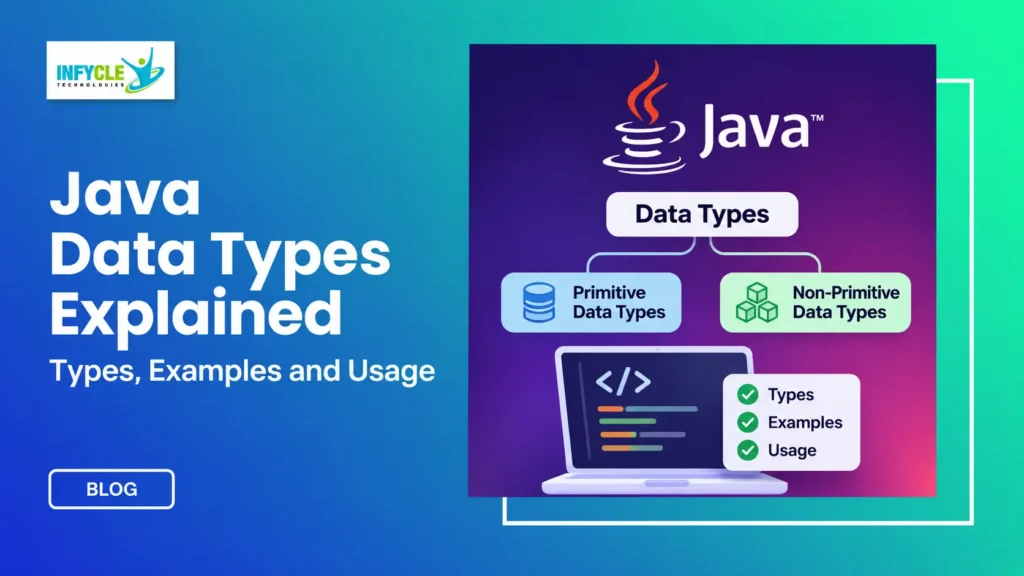
Java Data Types are divided into two main categories: primitive and non-primitive data types.
These categories help developers organize different kinds of values.
The two main categories are:
- Primitive Data Types: Store basic values such as numbers, characters, and Boolean values.
- Non-Primitive Data Types: Store references to objects, including strings, arrays, and user-defined objects.
Let’s understand each category with practical examples.
What Are Primitive Data Types in Java?
Primitive data types are the basic built-in data types in Java. They store simple values directly and include eight different types.
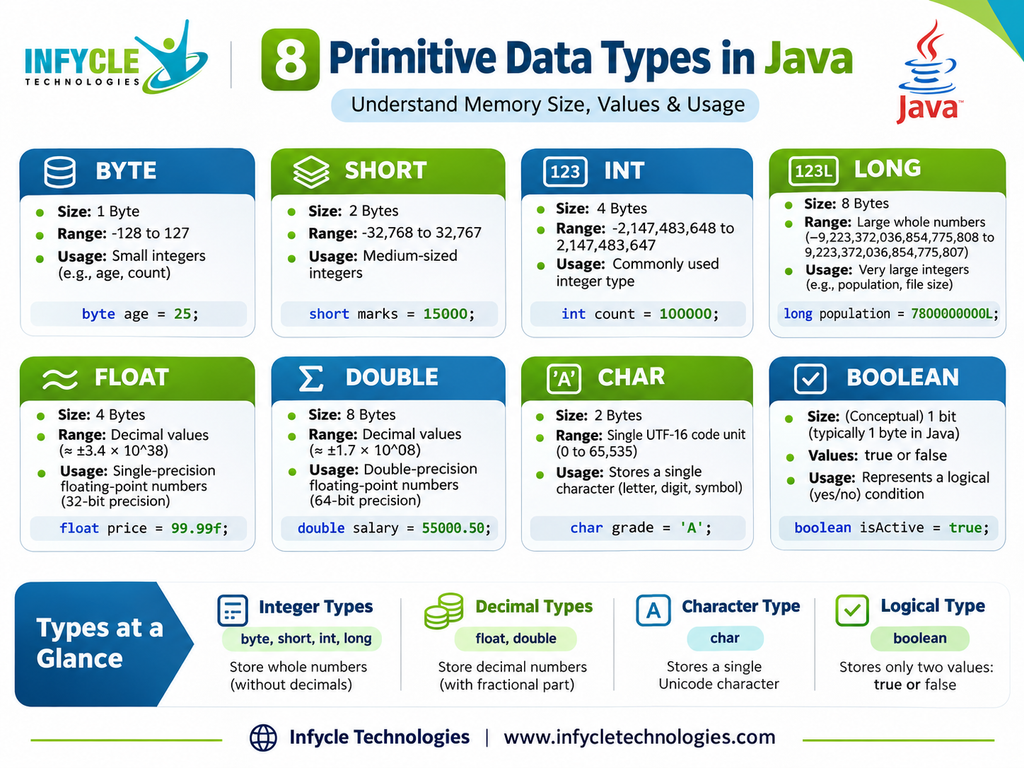
Java provides eight primitive data types. Each type has a specific purpose, memory size, and value range.
What Are the 8 Primitive Data Types in Java?
The following table explains all eight primitive data types.
| Data Type | Memory Size | Example | Usage |
|---|---|---|---|
| byte | 1 byte | byte age = 25; | Small integer values |
| short | 2 bytes | short number = 1000; | Small-range integers |
| int | 4 bytes | int salary = 30000; | General integer values |
| long | 8 bytes | long population = 8000000L; | Large integer values |
| float | 4 bytes | float price = 99.5f; | Decimal values |
| double | 8 bytes | double salary = 25000.75; | More precise decimal values |
| char | 2 bytes | char grade = 'A'; | Single UTF-16 code unit |
| boolean | JVM-dependent | boolean status = true; | True or false conditions |
Note: Primitive type sizes are defined by Java. However, the actual memory allocation for variables can depend on the JVM.
1. What Is the byte Data Type in Java?
The byte data type stores small integer values. It uses 1 byte of memory and supports values from -128 to 127.
For example:
public class ByteExample {
    public static void main(String[] args) {

        byte age = 25;
        System.out.println(age);

    }
}
Output:
25Therefore, byte is useful when working with small integer values, such as compact numerical data.
2. What Is the short Data Type in Java?
The short data type stores integer values within a limited range. It uses 2 bytes of memory.
Its value range is -32,768 to 32,767.
For example:
public class ShortExample {
    public static void main(String[] args) {

        short marks = 25000;
        System.out.println(marks);

    }
}
Output:
25000Similarly, short can represent values that exceed the byte range.
3. What Is the int Data Type in Java?
The int data type stores whole numbers without decimal points. It uses 4 bytes of memory.
Its value range is -2,147,483,648 to 2,147,483,647.
For example:
public class IntExample {
    public static void main(String[] args) {

        int age = 25;
        int salary = 30000;

        System.out.println(age);
        System.out.println(salary);

    }
}
Output:
25
30000
Furthermore, int is the most commonly used integer data type in Java.
4. What Is the long Data Type in Java?
The long data type stores large whole numbers. It uses 8 bytes of memory.
For example:
public class LongExample {
    public static void main(String[] args) {

        long population = 8000000000L;

        System.out.println(population);

    }
}
Output:
8000000000Notice the L at the end of the value. It identifies the number as a long literal.
Therefore, use long when an integer value exceeds the int range.
5. What Is the float Data Type in Java?
The float data type stores decimal numbers using 32-bit floating-point precision. It uses 4 bytes of memory.
For example:
public class FloatExample {
    public static void main(String[] args) {

        float percentage = 85.5f;

        System.out.println(percentage);

    }
}
Output:
85.5Notice the f suffix in the value. Java treats decimal literals as double by default.
Therefore, you must add f or F when assigning a decimal literal to a float variable.
6. What Is the double Data Type in Java?
The double data type stores decimal numbers with 64-bit floating-point precision. It uses 8 bytes of memory.
For example:
public class DoubleExample {
    public static void main(String[] args) {

        double salary = 25000.75;

        System.out.println(salary);

    }
}
Output:
25000.75Moreover, double provides greater precision than float. Therefore, developers commonly use it for calculations involving decimal values.
For financial calculations, however, BigDecimal is often a better choice because floating-point values cannot represent every decimal fraction exactly.
7. What Is the char Data Type in Java?
The char data type stores a single UTF-16 code unit. It uses 2 bytes of memory.
For example:
public class CharExample {
    public static void main(String[] args) {

        char grade = 'A';

        System.out.println(grade);

    }
}
Output:
ANotice that char values use single quotation marks.
Additionally, Java supports Unicode characters through char values. However, some Unicode characters require two char values, known as a surrogate pair.
8. What Is the boolean Data Type in Java?
The boolean data type stores only two possible values: true and false.
For example:
public class BooleanExample {
    public static void main(String[] args) {

        boolean isEligible = true;

        System.out.println(isEligible);

    }
}
Output:
trueBoolean values are especially useful for decision-making and conditional statements.
For instance, developers use boolean variables to check login status, payment status, and user eligibility.
What Are Non-Primitive Data Types in Java?
Non-primitive data types store references to objects rather than simple primitive values. They include strings, arrays, classes, interfaces, and other reference types.
Unlike primitive data types, non-primitive types can have methods and additional functionality.
Let’s understand the commonly used examples.
1. What Is the String Data Type in Java?
String is a class in Java that represents a sequence of characters. Developers use it to store text such as names, addresses, and messages.
For example:
public class StringExample {
    public static void main(String[] args) {

        String name = "Karthick";

        System.out.println(name);

    }
}
Output:
KarthickFurthermore, strings are immutable in Java. This means their contents cannot change after creation.
2. What Is an Array in Java?
An array stores multiple values of the same type under one variable name. It provides an indexed way to access individual elements.
For example:
public class ArrayExample {
    public static void main(String[] args) {

        int[] marks = {85, 90, 75, 80};

        System.out.println(marks[0]);

    }
}
Output:
85Here, the index starts from zero. Therefore, marks[0] returns the first value.
3. What Is a Class in Java?
A class is a blueprint for creating objects. It defines the properties and behaviours that its objects can have.
For example:
class Student {

    String name = "Arun";
    int age = 22;

}

public class Main {
    public static void main(String[] args) {

        Student s1 = new Student();

        System.out.println(s1.name);
        System.out.println(s1.age);

    }
}
Output:
Arun
22
Here, Student is a class, while s1 is an object reference.
4. What Is an Interface in Java?
An interface defines a contract that implementing classes must follow. It helps developers achieve abstraction and flexible application design.
For example:
interface Animal {

    void sound();

}

class Dog implements Animal {

    public void sound() {

        System.out.println("Dog barks");

    }

}
Therefore, interfaces are useful when multiple classes need to follow common behaviour.
What Is the Difference Between Primitive and Non-Primitive Data Types?
Primitive and non-primitive data types differ in how they represent values and support functionality.
The following table explains their major differences.
| Primitive Data Types | Non-Primitive Data Types |
|---|---|
| Store basic values | Store object references |
| Have eight built-in types | Include classes, arrays and interfaces |
| Cannot have their own methods | Can provide methods |
| Have fixed value sizes | Object sizes vary |
| Cannot normally store null | Reference variables can store null |
| Examples: int, char, boolean | Examples: String, arrays, objects |
For example, an int variable stores an integer value directly. On the other hand, a String variable refers to a String object.
Therefore, understanding this difference helps beginners write better Java programs.
How Do You Declare Variables in Java?
You declare a Java variable by specifying its data type, variable name, and optionally its initial value.
The general syntax is:
dataType variableName = value;For example:
int age = 25;
String name = "Arun";
double salary = 30000.50;
Java also supports different variable declaration styles.
What Are the Different Types of Variables in Java?
Java provides three common types of variables based on where you declare them.
1. Local Variables
Local variables are declared inside methods, constructors, or blocks. You must initialize them before using them.
public class Example {

    public void display() {

        int age = 25;

        System.out.println(age);

    }

}
2. Instance Variables
Instance variables belong to objects. Each object gets its own instance variable.
class Student {

    String name;
    int age;

}
3. Static Variables
Static variables belong to the class rather than individual objects. Therefore, all instances share the same static variable.
class Student {

    static String college = "ABC College";

}
These variable types help organize information in object-oriented programming.
Java Data Types with Practical Examples
Java Data Types become easier to understand when you apply them to real-world applications. For instance, consider a student management system.
You might need to store student information using different data types.
public class StudentDetails {

    public static void main(String[] args) {

        String studentName = "Arun";

        int rollNumber = 101;

        float percentage = 85.5f;

        char grade = 'A';

        boolean isPassed = true;

        double fees = 25000.75;

        System.out.println("Student Name: " + studentName);

        System.out.println("Roll Number: " + rollNumber);

        System.out.println("Percentage: " + percentage);

        System.out.println("Grade: " + grade);

        System.out.println("Passed: " + isPassed);

        System.out.println("Fees: " + fees);

    }

}
Output:
Student Name: Arun
Roll Number: 101
Percentage: 85.5
Grade: A
Passed: true
Fees: 25000.75
This example demonstrates how different Java Data Types work together.
Furthermore, similar concepts appear in banking applications, employee management systems, e-commerce platforms, and booking applications.
How Do You Choose the Right Java Data Type?
Choosing the correct data type depends on the value you want to store and the operations you need.
Here are some practical guidelines.
| Requirement | Recommended Data Type |
|---|---|
| Store age | int |
| Store student name | String |
| Store percentage | double or float |
| Store a single grade | char |
| Store login status | boolean |
| Store large integer values | long |
| Store multiple marks | int array |
| Store accurate monetary values | BigDecimal |
For example, use int for a student’s age because age generally requires a whole number.
Similarly, use String for names because they contain text.
However, avoid choosing a data type without considering its range and precision. This simple habit can prevent common programming errors.
What Are Common Mistakes When Using Java Data Types?
Beginners often make simple mistakes while working with Java Data Types. However, understanding these errors helps improve programming skills.
Here are some common mistakes and their solutions.
1. Assigning a Decimal Value to an Integer
Incorrect:
int price = 99.50;Correct:
double price = 99.50;An int cannot store a decimal value directly.
2. Forgetting the Float Suffix
Incorrect:
float percentage = 85.5;Correct:
float percentage = 85.5f;Java treats decimal literals as double by default.
3. Using Double Quotes for Char
Incorrect:
char grade = "A";Correct:
char grade = 'A';Char uses single quotation marks, whereas String uses double quotation marks.
4. Choosing an Incorrect Data Type Range
For example, assigning a value outside the int range causes a compilation error.
int number = 9000000000;Instead, use long:
long number = 9000000000L;5. Confusing String and Primitive Types
String is not a primitive data type. Instead, it is a reference type provided by Java.
Therefore, remember these differences when preparing for Java interviews.
Want to Learn Java with Practical Projects?
Understanding Java Data Types is only the first step toward becoming a Java developer. Furthermore, you need practical programming experience to build confidence.
At Infycle Technologies, Chennai, beginners can develop their Java knowledge through structured learning and hands-on practice.
Our Java training focuses on important programming concepts, including:
- Java fundamentals and data types
- Variables, operators, and control statements
- Object-Oriented Programming (OOPs)
- Arrays and String handling
- Collections Framework
- Exception handling
- JDBC and database connectivity
- Spring Boot fundamentals
- REST API development
- Practical projects and interview preparation
Whether you are a college student, fresher, or career changer, structured learning can help you build a strong programming foundation.
Explore: Java Training at Infycle Technologies
Self-Learning vs Structured Java Training: Which Is Better?
Both self-learning and structured Java training can help you learn programming. However, your learning style and career goals determine the better approach.
| Comparison | Self-Learning | Structured Java Training |
|---|---|---|
| Learning method | Independent study | Guided learning |
| Learning resources | Free videos and tutorials | Organized curriculum |
| Doubt clarification | Requires independent research | Trainer guidance |
| Practical exercises | Depends on personal effort | Guided coding practice |
| Learning discipline | Self-managed | Structured schedule |
| Projects | Self-selected | Can include guided projects |
| Interview preparation | Self-prepared | May include interview practice |
Which should you choose?
Self-learning is suitable if you enjoy independent exploration and can maintain a consistent schedule.
On the other hand, structured training can help beginners follow a clear learning path. Additionally, trainer guidance and practical exercises can make difficult concepts easier to understand.
Frequently Asked Questions About Java Data Types
1. What Are Java Data Types?
Java Data Types define the type of value a variable can store. Java supports eight primitive types and several reference types. For example, int stores whole numbers, double stores decimal values, char stores single UTF-16 code units, and String stores text.
2. How Many Primitive Data Types Are Available in Java?
Java has eight primitive data types: byte, short, int, long, float, double, char, and boolean. Each type supports a specific kind of value. Furthermore, they differ in memory size, range, and purpose.
3. Is String a Primitive Data Type in Java?
No, String is not a primitive data type in Java. Instead, String is a predefined class that represents a sequence of characters. Additionally, Java String objects are immutable, meaning their contents cannot change after creation.
4. What Is the Difference Between Float and Double in Java?
Float uses 4 bytes and provides 32-bit floating-point precision. In comparison, double uses 8 bytes and provides 64-bit precision. Therefore, double is generally preferred for decimal calculations. However, financial applications often use BigDecimal for accurate decimal arithmetic.
5. Which Java Data Types Should Beginners Learn First?
Beginners should first understand int, double, char, boolean, and String. These types cover many basic programming requirements. Next, learn byte, short, long, float, and arrays. Finally, practise using them in small Java programs.
Conclusion: Start Your Java Programming Journey
Java Data Types are essential building blocks of Java programming. They help developers store information, perform calculations, and build reliable applications.
In summary, Java provides eight primitive data types and several non-primitive types, including String, arrays, classes, and interfaces.
Furthermore, understanding variables, memory sizes, value ranges, and practical applications will strengthen your programming foundation.
However, learning concepts alone is not enough. You should practise writing programs, solving coding problems, and building real-world projects.
If you are looking for Java training in Chennai, Infycle Technologies can help you develop practical programming knowledge through structured learning.
Start with the fundamentals, practise consistently, and gradually move towards advanced Java development.