Data Analytics Roadmap for Freshers: Excel, SQL, Python, and Power BI
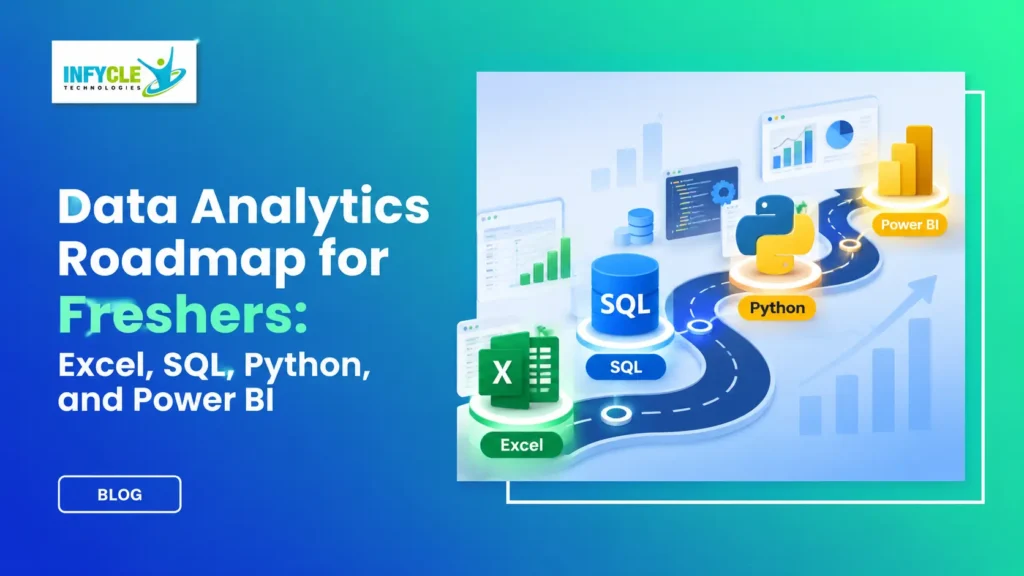
Want to start a career in data analytics but don’t know where to begin? This Data Analytics Roadmap will help you understand what to learn first and how to build practical skills.
Many fresh graduates believe they need an IT degree or advanced coding knowledge to enter the analytics field. However, that’s not true. Students from Commerce, Arts, Science, and Engineering backgrounds can begin learning data analytics.
Companies use data to understand customers, track sales, improve operations, and make better decisions. Therefore, professionals who can analyse information and explain their findings have valuable skills.
The best approach is to start with Excel, progress to SQL, learn Power BI, and then explore Python.
Moreover, practical projects help you understand how these tools work together.
Whether you’re a fresher, job seeker, or career changer, following a structured learning path can make your journey easier.
Let’s explore the essential skills, projects, and career opportunities that can help you prepare for your first analytics role.
Table of Contents
- What Is a Data Analytics Roadmap?
- Why Should Freshers Learn Data Analytics?
- Step 1: Excel Fundamentals
- Step 2: SQL for Data Analysis
- Step 3: Power BI and Visualization
- Step 4: Python Programming
- Essential Projects for Freshers
- A Practical Four-Month Learning Plan
- Self-Learning vs Structured Training
- Career Opportunities
- Common Beginner Mistakes
- Frequently Asked Questions
1. What Is a Data Analytics Roadmap?
A Data Analytics Roadmap is a structured learning plan that helps beginners develop the skills needed to analyse, interpret, and present data.
It explains which tools to learn, how to practise them, and how to prepare for entry-level jobs.
A beginner-friendly learning sequence includes:
- Excel for data cleaning and calculations.
- SQL for database queries.
- Power BI for interactive dashboards.
- Python for advanced analysis and automation.
- Practical projects for applying technical knowledge.
Furthermore, learners should develop communication and problem-solving skills.
These abilities help analysts explain complex information to non-technical teams.
2. Why Should Freshers Follow a Data Analytics Roadmap?
Freshers should follow a Data Analytics Roadmap because it provides a clear learning direction and prevents unnecessary confusion.
Many beginners start learning several tools simultaneously. However, this approach often makes it difficult to understand the fundamentals.
Instead, focus on mastering one tool before progressing to another.
Data analytics skills have applications across several industries, including:
- Banking and finance
- Healthcare
- Retail and e-commerce
- Information technology
- Manufacturing
- Digital marketing
- Logistics and supply chain
For example, an e-commerce company might analyse customer purchases to identify popular products.
Similarly, a healthcare organisation might study operational data to improve resource planning.
Therefore, analytics skills can support different career interests.
3. How Does Excel Fit Into the Data Analytics Roadmap?
Excel is an excellent starting point because it helps beginners understand data organisation, calculations, and basic analysis.
Although advanced tools offer additional features, Excel remains useful for many everyday business tasks.
Essential Excel Skills for Beginners
Start with these concepts:
- Sorting and filtering data
- Conditional formatting
- IF and nested IF functions
- SUMIF and COUNTIF
- XLOOKUP and VLOOKUP
- Pivot Tables
- Charts and graphs
- Data cleaning
- Power Query fundamentals
For instance, you can use Pivot Tables to identify which products generate the highest monthly revenue.
Additionally, Excel charts help you communicate findings clearly.
Beginner Project: Monthly Sales Analysis
Download a sample sales dataset and complete these tasks:
- Remove duplicate records.
- Identify missing values.
- Calculate total monthly revenue.
- Compare product performance.
- Create a sales summary dashboard.
As a result, you will understand how raw business data becomes useful information.
4. Why Is SQL Important in a Data Analytics Roadmap?
SQL is important because analysts use it to retrieve, filter, combine, and summarise information stored in databases.
Once you understand Excel, SQL is a useful next step.
Most importantly, SQL helps you work with structured data efficiently.
SQL Topics Every Fresher Should Learn
Focus on these concepts:
- SELECT and FROM
- WHERE and ORDER BY
- GROUP BY and HAVING
- Aggregate functions
- INNER JOIN and LEFT JOIN
- Subqueries
- Common Table Expressions
- Window functions
For example, imagine a company wants to identify its five highest-performing products.
You could use the following SQL query:
SELECT
    product_name,
    SUM(sales_amount) AS total_sales
FROM sales
GROUP BY product_name
ORDER BY total_sales DESC
LIMIT 5;
This example assumes a sales table with product_name and sales_amount columns.
The query calculates total sales for each product. Next, it sorts the results and displays the top five products.
Practical Project: Customer Purchase Analysis
Create a small database containing customer, product, and transaction information.
Then, write queries to identify repeat customers, popular products, and monthly revenue.
Consequently, you will gain experience answering business questions with SQL.
5. How Can Power BI Improve Your Data Analytics Skills?
Power BI helps analysts transform raw information into interactive reports and dashboards.
It allows businesses to understand trends without manually reviewing thousands of records.
Moreover, its visual features make data easier to explain.
What Should Beginners Learn in Power BI?
Start with:
- Power BI Desktop
- Data importing
- Power Query
- Data transformation
- Data modelling
- Relationships between tables
- DAX fundamentals
- Charts and visualisations
- Dashboard design
- Report filtering
For example, a retail dashboard might display monthly revenue, regional sales, and product performance.
Additionally, slicers allow users to explore specific categories.
Beginner Project: Retail Performance Dashboard
Create a dashboard containing:
- Total revenue
- Monthly sales trends
- Top-performing products
- Region-wise performance
- Category-wise sales
- Customer purchase patterns
However, avoid adding unnecessary visuals.
A good dashboard should answer important business questions quickly.
Build Practical Data Analytics Skills with Infycle Technologies
Are you looking for a structured learning experience rather than studying every tool separately?
Infycle Technologies offers a Data Analytics Course in Chennai covering Excel, SQL, Python, Power BI, and practical analytics concepts.
Students can explore:
- Trainer-guided learning
- Hands-on assignments
- Real-time project practice
- Resume-building guidance
- Mock interview preparation
- Placement assistance
Whether you’re from an IT or non-IT background, you can begin with foundational concepts.
6. Where Does Python Fit Into the Data Analytics Roadmap?
Python helps analysts automate repetitive tasks, process datasets, and perform more advanced analysis.
However, beginners don’t need to master complex programming before learning analytics.
Start with basic Python concepts and gradually explore data-focused libraries.
Important Python Topics for Data Analytics
Learn these fundamentals first:
- Variables and data types
- Lists and dictionaries
- Conditional statements
- Loops
- Functions
- File handling
Next, explore these libraries:
| Python Library | Main Purpose |
|---|---|
| Pandas | Data cleaning and analysis |
| NumPy | Numerical calculations |
| Matplotlib | Data visualisation |
| Seaborn | Statistical charts |
For example, Pandas can help you calculate average sales from a CSV dataset.
import pandas as pd

df = pd.read_csv("sales.csv")

print(df.head())

print(df["sales_amount"].mean())
This example assumes the file contains a sales_amount column.
Furthermore, Python allows you to combine data from different sources and automate calculations.
Beginner Project: Customer Behaviour Analysis
Use Python to clean customer records, identify purchase patterns, and visualise spending trends.
Eventually, you can combine Python, SQL, and Power BI within a single portfolio project.
7. Which Projects Should Freshers Include in Their Portfolio?
Freshers should build projects that demonstrate data cleaning, analysis, visualisation, and business problem-solving.
Certificates can support your profile. However, projects provide practical evidence of your skills.
Consider these five projects:
| Project | Tools Required | Learning Outcome |
|---|---|---|
| Monthly Sales Report | Excel | Data cleaning and reporting |
| Customer Purchase Analysis | SQL | Database querying |
| Retail Sales Dashboard | Power BI | Data visualisation |
| Customer Behaviour Study | Python | Data exploration |
| E-commerce Performance Analysis | Excel, SQL, Python, Power BI | End-to-end analysis |
For each project, explain the business problem and your approach.
Additionally, document the dataset, calculations, findings, and recommendations.
You can upload suitable projects to GitHub to demonstrate your learning progress.
8. What Is a Practical Four-Month Data Analytics Roadmap?
A four-month Data Analytics Roadmap can help dedicated beginners establish foundational skills and complete practical projects.
However, the actual duration depends on your background and daily learning schedule.
Here is a suggested plan:
| Month | Learning Focus | Expected Outcome |
|---|---|---|
| Month 1 | Excel and basic statistics | Create a sales report |
| Month 2 | SQL and database fundamentals | Complete a SQL analysis project |
| Month 3 | Power BI and dashboard design | Build an interactive dashboard |
| Month 4 | Python and portfolio development | Complete a Python analysis project |
Recommended Daily Learning Schedule
Try following this routine:
- 30 minutes: Understand a new concept.
- 45 minutes: Practise technical exercises.
- 30 minutes: Work on a project.
- 15 minutes: Review previous lessons.
Therefore, even two focused hours each day can help you make steady progress.
Nevertheless, consistency matters more than rushing through a syllabus.
9. Self-Learning vs Structured Data Analytics Training
Both self-learning and structured training can help beginners develop analytics skills.
However, they offer different learning experiences.
| Factor | Self-Learning | Structured Training |
|---|---|---|
| Learning Schedule | Flexible | Guided timetable |
| Curriculum | Self-selected | Organised modules |
| Trainer Support | Limited or community-based | Instructor guidance |
| Practical Projects | Self-managed | Guided assignments |
| Doubt Clarification | Forums and tutorials | Direct trainer interaction |
| Interview Preparation | Self-managed | May include mock interviews |
| Cost | Free or variable | Course fees apply |
Self-learning works well for disciplined learners who enjoy independent research.
On the other hand, structured training may help beginners who prefer regular guidance.
Before choosing any institute, review its curriculum, trainer experience, practical sessions, and support services.
If you’re comparing providers, don’t rely only on advertisements claiming to be the Best Software Training Institute in Chennai.
Instead, request a demo class and evaluate the learning experience yourself.
10. What Career Opportunities Can Freshers Explore?
Freshers with strong analytical foundations can explore several entry-level data-related positions.
However, each employer may require different technical and communication skills.
Common career paths include:
Junior Data Analyst: Cleans datasets, prepares reports, and identifies patterns.
Reporting Analyst: Creates regular business reports and monitors performance metrics.
MIS Executive: Manages operational data and prepares management reports.
Business Intelligence Analyst: Develops dashboards and supports business reporting.
Junior Business Analyst: Helps teams understand requirements and business processes.
Marketing Data Analyst: Analyses campaign performance and customer behaviour.
Furthermore, practical experience can help professionals progress towards specialised analytics positions.
Your first role doesn’t need to be your final career destination.
11. What Mistakes Should Beginners Avoid While Learning Data Analytics?
Beginners should avoid learning too many tools simultaneously and focusing only on theoretical knowledge.
Instead, build strong fundamentals through regular practice.
Common mistakes include:
Skipping Excel: Excel teaches important data handling concepts that support advanced analytics.
Ignoring SQL: Database skills are useful for many analyst positions.
Watching tutorials without practising: Passive learning rarely develops strong technical confidence.
Copying portfolio projects: Employers may ask you to explain your decisions and calculations.
Ignoring communication skills: Analysts must explain findings to people from different professional backgrounds.
Expecting immediate placement: Completing a course alone doesn’t guarantee employment.
Therefore, focus on developing genuine skills and measurable project experience.
12. Frequently Asked Questions
1. What Is the Best Data Analytics Roadmap for Freshers?
The best Data Analytics Roadmap starts with Excel, followed by SQL, Power BI, and Python. Beginners should also learn basic statistics and complete practical projects. This structured approach helps learners build technical confidence and prepare for entry-level analytics opportunities.
2. Can Non-IT Students Learn Data Analytics?
Yes, non-IT students can learn data analytics without an engineering or computer science degree. Commerce, Arts, and Science graduates can begin with Excel and basic statistics. Moreover, consistent practice helps them gradually develop SQL, Python, and dashboard-building skills.
3. Is Python Compulsory for Data Analytics?
Python is valuable but isn’t compulsory for every entry-level analytics role. Some positions focus primarily on Excel, SQL, and Power BI. However, learning Python can expand your technical capabilities and help you handle more complex data analysis tasks.
4. How Long Does It Take to Learn Data Analytics?
Beginners can build foundational data analytics skills within four to six months through consistent learning. However, the timeline depends on previous knowledge, practice hours, and project complexity. Regular assignments and practical projects can improve understanding and technical confidence.
5. Which Course Should Freshers Choose for Data Analytics?
Freshers should choose a course covering Excel, SQL, Python, Power BI, statistics, and practical projects. Additionally, evaluate trainer experience, assignments, interview preparation, and placement assistance. Attending a demo class can help you understand the teaching approach before enrolling.
Conclusion: Start Your Data Analytics Career with the Right Skills
Following a structured Data Analytics Roadmap helps beginners understand what to learn and how to apply their knowledge.
First, develop your Excel skills. Next, learn SQL to work with databases. Then, explore Power BI for reporting and Python for advanced analysis.
Most importantly, complete practical projects and build a portfolio that demonstrates your abilities.
If you’re searching for Data Analytics Training in Chennai, Infycle Technologies offers structured learning focused on technical fundamentals, hands-on projects, and career preparation.
You don’t need an IT degree to begin. However, you do need curiosity, consistency, and a willingness to practise.