What Is Technical SEO? Important Factors and Checklist
Introduction
A website needs more than quality content to rank well on Google. It also needs a strong technical foundation that helps search engines discover, crawl, and index its pages. Technical SEO Checklist is a practical way to identify website issues and improve search performance.
Technical SEO focuses on the behind-the-scenes elements of a website. For example, it includes website speed, mobile usability, HTTPS security, XML sitemaps, robots.txt, and structured data. Furthermore, these improvements help search engines understand your website and deliver a better user experience.
For business owners, bloggers, and digital marketers, technical SEO is an essential part of search engine optimization. However, many beginners focus only on keywords and backlinks. They often overlook technical problems that can prevent valuable pages from appearing in search results.
Therefore, understanding technical SEO can help you build a stronger SEO strategy. You can also use a checklist to find errors, prioritize fixes, and track improvements over time.
If you are exploring a digital marketing course in Chennai, learning technical SEO can strengthen your practical skills. Moreover, it can help you understand how websites attract organic traffic and support business growth.
Let’s explore the important technical SEO factors, common mistakes, and a practical checklist you can use on any website.
Table of Contents
- What Is Technical SEO?
- Why Is Technical SEO Important?
- What Are the Important Technical SEO Factors?
- What Is a Technical SEO Checklist?
- How Can You Audit Technical SEO?
- What Tools Help With Technical SEO?
- Self-Learning vs. Structured SEO Training
- Frequently Asked Questions
- Conclusion
What Is Technical SEO?
Technical SEO is the process of improving a website’s technical structure so search engines can crawl, index, and understand its content efficiently.
For example, search engines need to access important pages before they can consider those pages for search results. Therefore, technical SEO helps remove barriers that prevent discovery and indexing.
It covers several areas, including website architecture, page speed, mobile usability, URL structure, security, and duplicate content management. In addition, it supports other SEO activities, such as content optimization and link building.
Example: Imagine you publish a useful blog post, but your website accidentally blocks search engines from crawling it. Although the content is valuable, Google may not index it. Fixing the crawling issue can help Google discover the page.
However, technical SEO does not guarantee higher rankings. Instead, it creates a healthy foundation that allows search engines to access your content and evaluate its relevance.
Why Is Technical SEO Important?
Technical SEO helps search engines access important pages while improving website usability and supporting organic search performance.
A technically healthy website makes it easier for search engines to discover useful content. Furthermore, visitors benefit from faster loading pages, secure connections, and smoother navigation.
Here are the main benefits:
- Better crawling: Search engines can discover important pages more efficiently.
- Improved indexing: Eligible pages can enter Google’s index when they meet its requirements.
- Better user experience: Faster pages and mobile-friendly layouts help visitors navigate your website.
- Stronger website security: HTTPS protects connections between websites and visitors.
- Reduced duplication: Canonical tags and redirects help search engines understand preferred URLs.
- More efficient SEO work: Technical fixes allow content and link-building efforts to support accessible pages.
For businesses in Chennai, these benefits can support stronger online visibility. Consequently, technical SEO can contribute to lead generation, brand awareness, and website conversions.
What Are the Important Technical SEO Factors?
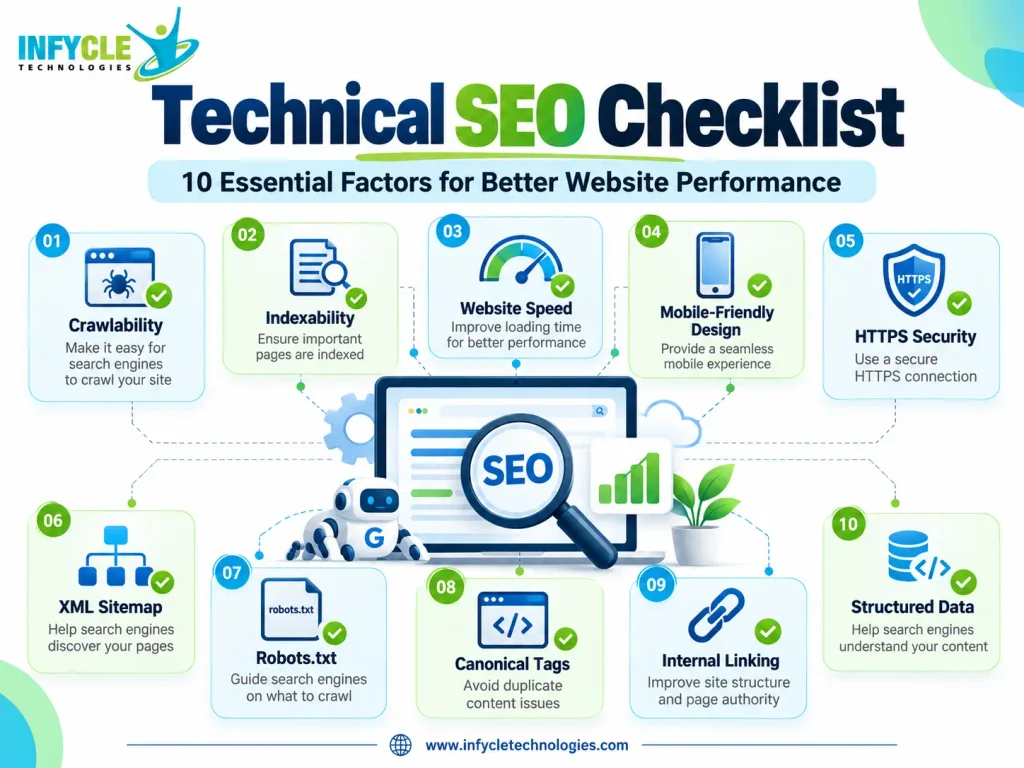
The most important technical SEO factors include crawlability, indexability, website speed, mobile usability, HTTPS, site architecture, canonical URLs, structured data, and XML sitemaps.
However, not every website has the same technical problems. Therefore, you should prioritize issues according to their impact on important pages and business goals.
1. How Does Website Crawlability Affect SEO?
Crawlability determines whether search engine bots can access and discover your website’s pages.
Google uses automated crawlers to discover web pages and follow links. Therefore, blocked resources, broken internal links, and incorrect robots.txt rules can prevent effective crawling.
To improve crawlability:
- Check your robots.txt file.
- Link important pages from relevant sections of your website.
- Fix broken internal links.
- Avoid unnecessary redirect chains.
- Make important pages accessible without complicated navigation.
Furthermore, use Google Search Console to inspect individual URLs and identify crawling problems.
2. Why Is Indexability Important for Technical SEO?
Indexability determines whether search engines can include eligible pages in their search indexes.
A page can be crawlable without being indexed. For instance, a page containing a noindex directive tells search engines not to include it in their indexes.
Check the following elements:
- Remove unintended
noindexdirectives. - Review canonical tags.
- Confirm that important pages return appropriate HTTP status codes.
- Check Google’s indexing reports.
- Ensure that valuable pages contain useful, accessible content.
However, remember that removing technical barriers does not guarantee indexing. Google makes its own indexing decisions based on several factors.
3. How Can Website Speed Improve User Experience?
Website speed affects how quickly visitors can access and interact with your content. Therefore, improving loading performance can support usability and search performance.
Google evaluates page experience using several signals, including Core Web Vitals. These metrics measure loading performance, responsiveness, and visual stability.
The main Core Web Vitals are:
- Largest Contentful Paint (LCP): Measures loading performance. Aim for 2.5 seconds or less.
- Interaction to Next Paint (INP): Measures responsiveness. Aim for 200 milliseconds or less.
- Cumulative Layout Shift (CLS): Measures visual stability. Aim for 0.1 or less.
These thresholds apply to the 75th percentile of page visits.
To improve performance, compress images, reduce unnecessary JavaScript, enable suitable caching, and use efficient hosting. Additionally, test real user performance instead of relying only on a single laboratory score.
4. Is Mobile-Friendly Design Necessary for Technical SEO?
Yes, mobile-friendly design is essential because Google primarily uses the mobile version of a website’s content for indexing.
A website should display properly on smartphones, tablets, and desktops. Otherwise, visitors may struggle to read content, navigate menus, or complete forms.
To improve mobile usability:
- Use responsive web design.
- Choose readable font sizes.
- Keep buttons easy to tap.
- Avoid horizontal scrolling.
- Ensure mobile pages contain important content.
- Test layouts on different screen sizes.
Furthermore, check mobile performance with PageSpeed Insights and inspect representative URLs using Google Search Console.
5. How Do HTTPS and Website Security Support SEO?
HTTPS encrypts the connection between a visitor’s browser and your website.
Google uses HTTPS as a lightweight ranking signal. In addition, secure connections help protect information exchanged between users and websites.
Follow these steps to maintain website security:
- Install a valid SSL/TLS certificate.
- Redirect HTTP URLs to their HTTPS versions.
- Update internal links to use HTTPS.
- Fix mixed-content warnings.
- Renew certificates before they expire.
However, HTTPS alone cannot guarantee high rankings. You should combine website security with useful content, good usability, and sound technical practices.
6. Why Do XML Sitemaps Matter?
An XML sitemap lists important URLs that you want search engines to discover.
It helps search engines understand which pages exist on your website. Moreover, it can provide useful information about page relationships and update patterns, although search engines do not guarantee crawling or indexing.
A good XML sitemap should:
- Include canonical URLs that return successful responses.
- Exclude URLs that you do not want indexed.
- Avoid broken and redirected URLs.
- Update when important content changes.
- Be submitted through Google Search Console when appropriate.
For example, an educational website can include important course pages, service pages, and useful blog posts in its sitemap.
7. What Is the Role of Robots.txt?
The robots.txt file provides crawling instructions to compliant search engine bots.
It can help control crawler access to specific areas of a website. However, it does not guarantee that a URL stays out of search results.
For example, you can use robots.txt rules to reduce crawling of certain low-value areas. Nevertheless, do not accidentally block important pages or resources that search engines need to understand your content.
Also, use noindex when you need to prevent an accessible page from appearing in search results. Search engines must be able to crawl the page to see that directive.
8. How Do Canonical Tags Prevent Duplicate Content Problems?
Canonical tags indicate which URL you prefer search engines to treat as the primary version of similar or duplicate pages.
Websites can create multiple URLs for similar content through filters, tracking parameters, or different URL variations. Therefore, canonical tags help communicate your preferred version.
For example, a product page may be accessible through several tracking URLs. A canonical tag can point search engines toward the main product URL.
To manage canonical URLs:
- Use the correct canonical URL.
- Keep internal links consistent.
- Include canonical URLs in XML sitemaps.
- Avoid conflicting canonical signals.
- Check important pages for accidental self-referencing or incorrect canonicals.
However, Google treats canonical tags as signals rather than absolute commands.
9. Why Are Internal Links and Website Architecture Important?
A clear website structure helps visitors and search engines navigate related pages.
Organize content into logical categories and connect important pages through relevant internal links. Furthermore, use descriptive anchor text so visitors understand what each link offers.
For example, a digital marketing website can connect its SEO blog posts to relevant training pages. This structure helps users discover related resources while supporting search engines’ understanding of page relationships.
Avoid orphan pages that have no useful internal links pointing to them. Also, keep navigation simple and ensure that important pages remain accessible.
10. How Does Structured Data Support Technical SEO?
Structured data helps search engines interpret specific information about your content.
Websites can use supported Schema.org vocabulary and formats such as JSON-LD to describe products, articles, organizations, courses, and other entities.
For example, Article structured data can help identify an article’s headline, author, and publication details. Meanwhile, appropriate LocalBusiness structured data can describe relevant business information.
Validate your markup with suitable testing tools. However, structured data does not guarantee rich results, and you should never add misleading information.
11. How Should You Handle Redirects and Broken Links?
Redirects guide visitors and crawlers from one URL to another, while broken links lead to unavailable destinations.
When a page permanently moves, a 301 redirect often provides an appropriate solution. Similarly, temporary redirects may suit genuinely temporary changes.
To maintain healthy links:
- Fix internal links that return 404 errors.
- Redirect outdated URLs to relevant replacement pages.
- Avoid redirect chains and loops.
- Preserve useful backlinks when changing URLs.
- Return appropriate status codes for unavailable pages.
Furthermore, avoid redirecting unrelated pages to your homepage simply to remove errors. Relevant redirects create a better experience for both users and search engines.
What Is a Technical SEO Checklist?
A Technical SEO Checklist is a practical list of checks that helps you identify website issues and organize fixes by priority.
Use the following checklist during a new website launch, a redesign, or a regular SEO audit.
| Technical SEO task | What to check | Priority |
|---|---|---|
| Crawlability | Confirm important pages are accessible | High |
| Indexability | Check noindex and indexing reports | High |
| HTTPS | Verify secure URLs and certificates | High |
| XML sitemap | Submit a clean, current sitemap | High |
| Robots.txt | Ensure important pages are not blocked | High |
| Canonical tags | Confirm preferred URLs are correct | High |
| Core Web Vitals | Measure LCP, INP, and CLS | High |
| Mobile usability | Test responsive layouts and navigation | High |
| Broken links | Find and repair relevant 404 errors | Medium |
| Redirects | Remove unnecessary chains and loops | Medium |
| Structured data | Validate relevant schema markup | Medium |
| Internal links | Improve navigation and page discovery | Medium |
| Duplicate content | Review URL variations and duplication | Medium |
| URL structure | Keep URLs clear and consistent | Medium |
| Security | Review certificates and mixed content | High |
First, fix critical crawling, indexing, and security problems. Next, improve performance and navigation. Finally, review structured data and other enhancements.
Keep a record of each issue, its affected URLs, the fix, and the date of verification. As a result, you can measure progress and prevent recurring problems.
How Can You Audit Technical SEO Step by Step?
You can audit technical SEO by checking your website’s accessibility, indexing, performance, links, and structured data.
Follow this beginner-friendly process:
Step 1: Set up Google Search Console.
First, verify your website and review indexing reports, sitemap status, and URL inspection results.
Step 2: Test website performance.
Next, use PageSpeed Insights to examine Core Web Vitals and identify slow-loading elements.
Step 3: Review crawling and indexing.
Then, inspect robots.txt rules, noindex directives, canonical tags, and HTTP status codes.
Step 4: Crawl your website.
Use an SEO crawler to discover broken links, redirect chains, duplicate titles, and orphan pages where possible.
Step 5: Check mobile usability.
Additionally, test important pages on different devices and verify that users can access key content.
Step 6: Validate structured data.
Finally, check supported schema markup and correct any errors that affect eligibility.
After completing these steps, prioritize fixes by business impact. Recheck the affected pages after implementation, because a successful fix should resolve the original issue rather than simply change a report.
Which Tools Can Help With a Technical SEO Checklist?
The right SEO tools help you detect technical problems, understand their causes, and verify improvements.
Here are some useful options for beginners and professionals:
| Tool | Main purpose | Best use |
|---|---|---|
| Google Search Console | Indexing and search performance reports | Finding indexing issues |
| PageSpeed Insights | Performance and Core Web Vitals | Improving page speed |
| Lighthouse | Website quality audits | Checking performance and accessibility |
| Screaming Frog SEO Spider | Website crawling | Finding broken links and redirects |
| Rich Results Test | Supported structured data testing | Checking rich-result eligibility |
| Bing Webmaster Tools | Bing search diagnostics | Reviewing visibility and technical issues |
Furthermore, several tools offer free features that are useful for beginners. However, larger websites may require paid crawling limits or advanced reporting.
Start with Google Search Console and PageSpeed Insights. Then, add a crawling tool when you need a more detailed technical audit.
How Can You Learn Technical SEO Through Practical Training?
Practical training helps beginners connect SEO concepts with real website problems and business goals.
Reading guides is a useful starting point. However, working on an actual website helps you understand how crawling, indexing, performance, and optimization interact.
For example, you can audit a sample website, identify missing metadata, review page speed, and prepare a technical SEO report. Furthermore, you can practise keyword research, on-page SEO, content optimization, and Google Search Console analysis.
If you are searching for digital marketing training in Chennai, choose a program that includes practical projects and guided feedback. The Best Software Training Institute in Chennai for your goals should also help you build a portfolio and understand current industry tools.
Want to Build Practical Digital Marketing Skills?
At Infycle Technologies, Chennai, learners can explore digital marketing concepts and develop practical skills through guided training.
Focus on learning website audits, keyword research, on-page SEO, technical SEO, analytics, and reporting. In addition, practise using real tools and documenting your findings.
Explore the digital marketing training options at Infycle Technologies and ask about course content, hands-on projects, and demo classes before enrolling.
Self-Learning vs. Structured SEO Training: Which Is Better?
Both self-learning and structured training can help you develop technical SEO skills. However, the best option depends on your learning style, available time, and need for feedback.
| Factor | Self-learning | Structured training |
|---|---|---|
| Learning pace | Flexible | Usually follows a planned schedule |
| Cost | Often low | May require course fees |
| Guidance | You find answers independently | Trainers can explain difficult concepts |
| Practical work | Depends on your own projects | May include guided assignments |
| Feedback | Mostly self-evaluation | May include trainer reviews |
| Accountability | Requires self-discipline | A schedule can support consistency |
| Career preparation | Depends on portfolio development | May include interview and project support |
Therefore, choose self-learning if you enjoy independent research and can practise consistently. On the other hand, structured training may suit you if you prefer guidance, feedback, and a clear learning path.
Before joining any program, review its syllabus, trainer experience, project work, and placement-related claims. Ultimately, your practical skills and ability to explain your work matter more than the learning format alone.
Frequently Asked Questions About Technical SEO
1. What Is Technical SEO in Simple Words?
Technical SEO improves the parts of a website that help search engines crawl, understand, and index its pages. It includes website speed, mobile usability, HTTPS, sitemaps, robots.txt, canonical tags, and structured data. Therefore, it supports website accessibility and overall search engine optimization.
2. What Is Included in a Technical SEO Checklist?
A Technical SEO Checklist covers crawling, indexing, website security, page speed, mobile usability, XML sitemaps, robots.txt, canonical tags, redirects, internal links, and structured data. Furthermore, it helps marketers prioritize problems, track fixes, and verify whether important pages remain accessible to search engines.
3. Is Technical SEO Important for Small Businesses?
Yes, technical SEO helps small businesses make important pages easier to discover and use. For example, a local business can improve mobile usability, fix broken links, and submit an XML sitemap. However, results depend on competition, content quality, website condition, and other ranking factors.
4. Which Tools Are Best for Beginners Learning Technical SEO?
Google Search Console and PageSpeed Insights are useful starting points for beginners. Additionally, Lighthouse helps assess website quality, while Screaming Frog can identify technical issues across multiple URLs. Start with free features, practise on a website, and learn how to interpret reports before investing in paid tools.
5. Can I Learn Technical SEO Through a Digital Marketing Course in Chennai?
Yes, a digital marketing course in Chennai can help you learn technical SEO alongside keyword research, content optimization, analytics, and reporting. Choose training that includes website audits, practical assignments, and trainer feedback. Furthermore, build a portfolio by documenting technical issues and explaining how you resolved them.
Conclusion
Technical SEO creates a strong foundation for website visibility by helping search engines discover, crawl, and understand important pages.
A reliable Technical SEO Checklist should cover crawlability, indexability, Core Web Vitals, mobile usability, HTTPS, XML sitemaps, robots.txt, canonical tags, redirects, and structured data. Furthermore, regular audits help you identify problems before they affect important website pages.
Start with the basics, use trusted tools, and fix high-priority issues first. Then, measure improvements and continue learning through practical projects.
If you want to develop these skills professionally, consider a digital marketing course in Chennai that combines SEO fundamentals with hands-on training. With consistent practice, you can build a stronger foundation for digital marketing roles and real-world website optimization.