Types of CSS (Cascading Style Sheet): A Beginner’s Guide
CSS, or Cascading Style Sheets, controls how HTML content looks on a webpage. Types of CSS explain the different ways developers can apply styles to HTML elements.
CSS helps control colors, fonts, spacing, layouts, borders, buttons, and responsive designs. Therefore, learning CSS is an important step for anyone starting web development.
There are three main types of CSS: Inline CSS, Internal CSS, and External CSS. Each method has a different purpose. For example, Inline CSS works well for a small one-time change. However, External CSS is better for large websites because it keeps styling separate from HTML.
Furthermore, understanding these methods helps beginners write cleaner and more manageable code. It also creates a strong foundation for frontend and full stack development.
For students and fresh graduates in Chennai, CSS is a useful skill for building practical web projects. Moreover, it is commonly used with HTML and JavaScript in modern web development.
This guide explains the Types of CSS, their differences, advantages, disadvantages, examples, and practical use cases.
Table of Contents
- What Is CSS?
- What Are the Types of CSS?
- What Is Inline CSS?
- What Are the Advantages of Inline CSS?
- What Is Internal CSS?
- What Are the Advantages of Internal CSS?
- What Is External CSS?
- What Are the Advantages of External CSS?
- Types of CSS: Which Method Should You Choose?
- Types of CSS: What Is the Difference?
- How Do Types of CSS Work With HTML?
- Why Should Beginners Learn Types of CSS?
- Self-Learning vs Structured Training
- Frequently Asked Questions
- Start Your Full Stack Learning Journey
- Conclusion
What Is CSS?
CSS is a stylesheet language used to design and format HTML webpages. It controls the visual appearance of elements such as text, images, buttons, menus, and layouts.
HTML creates the structure of a webpage. However, CSS controls how that structure appears to users.
For example, HTML can create a heading:
<h1>Welcome to My Website</h1>CSS can change its color:
h1 {
    color: blue;
}
Therefore, HTML and CSS usually work together. In addition, JavaScript can add interaction and dynamic behavior to the webpage.
What Are the Types of CSS?
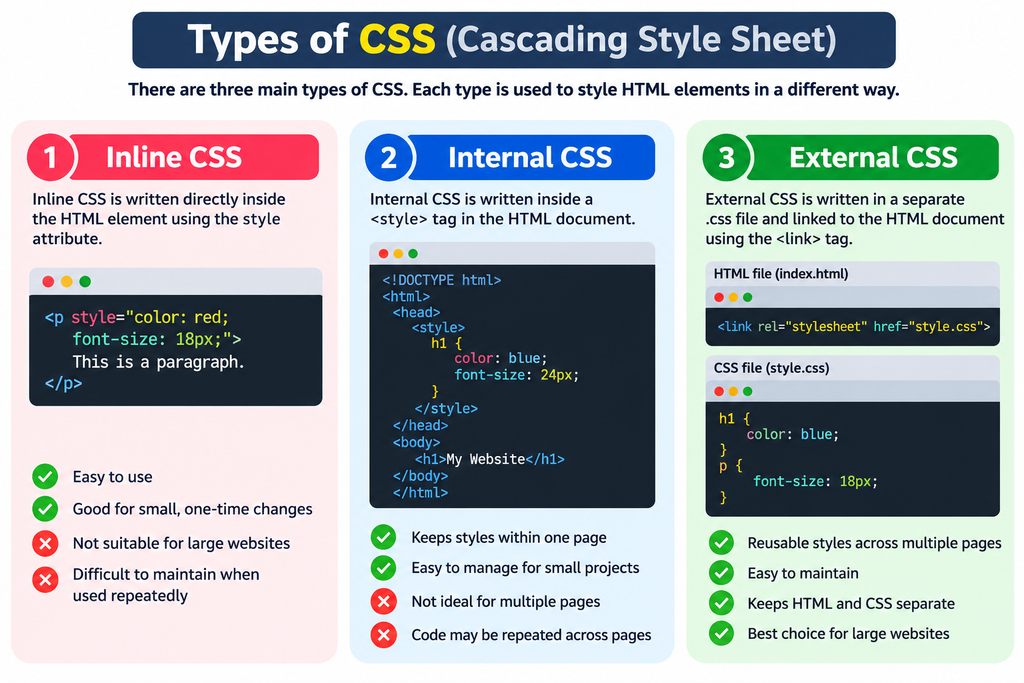
There are three main Types of CSS: Inline CSS, Internal CSS, and External CSS.
These methods differ mainly in where developers write the CSS rules.
| Type of CSS | Where CSS Is Written | Best Use |
|---|---|---|
| Inline CSS | Inside HTML element | Small individual changes |
| Internal CSS | Inside <style> tag | Single-page designs |
| External CSS | Separate .css file | Multiple-page websites |
Furthermore, each method has advantages and limitations. Therefore, developers should choose the method based on project size and maintenance needs.
What Is Inline CSS?
Inline CSS applies styling directly to an HTML element using the style attribute.
For example:
<p style="color: red;">This is a paragraph.</p>Here, the paragraph receives a red text color.
Inline CSS is simple because the style appears directly inside the HTML element. However, it becomes difficult to manage when many elements need similar styles.
Therefore, developers usually use Inline CSS only for small or specific styling requirements.
When Should You Use Inline CSS?
Inline CSS works best when you need to apply a unique style to one particular element.
For instance, you may want one button to have a special background color. In that case, Inline CSS can provide a quick solution.
However, using too much Inline CSS can make HTML difficult to read. Moreover, repeating styles across many elements increases maintenance work.
What Are the Advantages of Inline CSS?
Inline CSS provides quick and direct styling for individual HTML elements.
First, it is easy for beginners to understand. Furthermore, you do not need to create another CSS file.
For example:
<h2 style="color: green; font-size: 30px;">
    Learn Web Development
</h2>
The browser applies the styles directly to the heading. Therefore, Inline CSS can be useful for quick testing and small changes.
However, it is not ideal for large websites because repeated styles can create messy code.
What Is Internal CSS?
Internal CSS places CSS rules inside a <style> element in the HTML document.
For example:
<!DOCTYPE html>
<html>
<head>
    <style>
        h1 {
            color: blue;
        }

        p {
            font-size: 18px;
        }
    </style>
</head>
<body>

    <h1>My Website</h1>
    <p>Welcome to my webpage.</p>

</body>
</html>
Here, the CSS rules are written inside the <head> section.
Internal CSS is useful when a webpage needs its own unique styles. Therefore, it can work well for small websites or single-page projects.
When Should You Use Internal CSS?
Internal CSS is useful when styles apply mainly to one webpage.
For example, a landing page may have a unique design that does not need to be shared with other pages. In that situation, Internal CSS can be practical.
However, multiple pages may require the same styles. As a result, repeating Internal CSS across pages can increase code duplication.
What Are the Advantages of Internal CSS?
Internal CSS keeps the styling rules within the same HTML document.
First, it is easier to manage than large amounts of Inline CSS. Furthermore, all styles for one page remain in one location.
It can also be useful for prototypes and small projects. However, it becomes less efficient when a website contains many pages.
Therefore, developers generally prefer External CSS for larger projects.
What Is External CSS?
External CSS stores styling rules in a separate .css file. The HTML page connects to that file using the <link> element.
For example, the HTML file can contain:
<link rel="stylesheet" href="style.css">The separate style.css file can contain:
h1 {
    color: blue;
}

p {
    font-size: 18px;
}

button {
    background-color: green;
    color: white;
}
External CSS is widely used in professional web development. Moreover, one CSS file can style multiple HTML pages.
Why Is External CSS Popular?
External CSS separates content from presentation. Therefore, developers can maintain HTML and CSS more easily.
For example, if a website has 20 pages, one stylesheet can provide common styles across those pages. As a result, developers can update the design without editing every HTML file.
Furthermore, this approach makes projects cleaner and easier for teams to maintain.
What Are the Advantages of External CSS?
External CSS provides better organization and reusability for websites.
First, developers can reuse the same stylesheet across multiple pages. In addition, they can update common styles from one file.
External CSS also improves code readability. Moreover, it supports better project organization.
For professional websites, this method is usually the preferred choice. Therefore, beginners should understand External CSS well when learning frontend development.
Types of CSS: Which Method Should You Choose?
The best Types of CSS method depends on the size and requirements of your project.
For a quick individual change, Inline CSS can be useful. However, Internal CSS may be better when one webpage needs custom styling.
For multi-page websites, External CSS is generally the better option. Furthermore, it supports reusable styles and easier maintenance.
A simple rule is:
- Use Inline CSS for small, individual changes.
- Use Internal CSS for page-specific styling.
- Use External CSS for reusable website-wide styling.
Therefore, beginners should learn all three methods but focus more on External CSS for professional development.
Types of CSS: What Is the Difference?
The main difference between the Types of CSS is where the CSS rules are placed and how widely they can be reused.
| Feature | Inline CSS | Internal CSS | External CSS |
|---|---|---|---|
| Location | HTML element | <style> tag | Separate CSS file |
| Reusability | Low | Medium | High |
| Maintenance | Difficult | Moderate | Easy |
| Multiple pages | Not ideal | Not ideal | Excellent |
| Best for | Small changes | Single pages | Large websites |
Therefore, External CSS is usually the most scalable approach.
However, Inline and Internal CSS still have practical uses. For example, developers may use them during testing or for special page-specific requirements.
How Do Types of CSS Work With HTML?
The Types of CSS work by applying CSS rules to HTML elements.
A CSS rule normally contains a selector and declarations.
For example:
p {
    color: blue;
    font-size: 16px;
}
Here, p is the selector. The color and font-size properties define the required styles.
First, the browser reads the HTML structure. Next, it reads the CSS rules. Then, it applies matching styles to the webpage.
As a result, users see a visually designed webpage instead of plain HTML content.
Why Should Beginners Learn Types of CSS?
Learning the Types of CSS gives beginners a strong foundation in web development.
First, CSS helps students create attractive websites. Furthermore, it helps them understand layouts, colors, typography, spacing, and responsive design.
CSS is also an important part of frontend development. Therefore, students who plan to become full stack developers should understand CSS along with HTML and JavaScript.
For example, a beginner can build a portfolio website after learning these fundamentals. Later, the same knowledge can support React, Angular, or other frontend technologies.
What Can You Build After Learning CSS?
After learning CSS, you can create websites, landing pages, portfolios, forms, navigation bars, dashboards, and responsive layouts.
Furthermore, CSS can help you improve the user experience of web applications. You can also combine CSS with JavaScript to create interactive interfaces.
Therefore, CSS is not only a design skill. It is also an important foundation for practical web development.
Self-Learning vs Structured Training
Both self-learning and structured training can help you learn CSS. However, structured training can provide a clearer learning path and practical guidance.
| Factor | Self-Learning | Structured Training |
|---|---|---|
| Learning path | You create it | Trainer provides it |
| Doubt clarification | Limited | Direct support |
| Practical projects | Self-managed | Guided |
| Consistency | Depends on learner | Scheduled |
| Career guidance | Limited | Can be included |
For example, YouTube and documentation can help beginners understand CSS concepts. However, a structured course can provide projects, assignments, feedback, and mentor support.
Therefore, choose the learning method that matches your goals and learning style.
Frequently Asked Questions About Types of CSS
What are the three Types of CSS?
The three main Types of CSS are Inline CSS, Internal CSS, and External CSS. Inline CSS styles individual elements. Internal CSS styles one webpage. External CSS uses a separate stylesheet for reusable styling across multiple webpages.
Which type of CSS is best for websites?
External CSS is generally the best choice for multi-page websites because it supports reusable styles and easier maintenance. However, Inline and Internal CSS can still help with specific styling needs, testing, and page-level customization.
Is CSS difficult for beginners?
CSS is not difficult when you learn it step by step. First, learn selectors and properties. Next, practice colors, fonts, spacing, and layouts. Finally, build responsive projects to improve your practical understanding.
Why should students learn Types of CSS?
Students should learn Types of CSS because CSS is a core web development skill. Furthermore, understanding Inline, Internal, and External CSS helps learners build cleaner websites and prepares them for frontend and full stack development.
Can CSS help me become a full stack developer?
Yes, CSS is an important frontend skill for full stack developers. However, you also need HTML, JavaScript, a frontend framework, backend technology, databases, APIs, and development tools to become job-ready.
Start Your Full Stack Learning Journey With Infycle Technologies
Learning CSS is only the beginning of your web development journey. If you want to move from basic webpage design to complete application development, structured learning can help.
At Infycle Technologies, Chennai, learners can develop practical skills through project-based training.
Furthermore, a Full Stack Developer course in Chennai can help you learn frontend development, backend programming, databases, APIs, and application development in a structured way.
The training can be useful for college students, fresh graduates, career changers, and beginners who want practical IT skills.
Ready to start? Explore Full Stack Developer training in Chennai and build your skills through practical learning.
Conclusion
The three main Types of CSS are Inline CSS, Internal CSS, and External CSS. Each method has a specific purpose and level of reusability.
Inline CSS works well for small changes. Internal CSS is useful for page-specific styling. However, External CSS is generally better for larger and multi-page websites.
Therefore, beginners should understand all three methods and learn when to use each one.
If your goal is to become a professional web developer, CSS should be combined with HTML, JavaScript, databases, backend technologies, and APIs.
For students and job seekers in Chennai, a Full Stack Developer course in Chennai can provide a structured path from frontend basics to complete application development.
Ultimately, consistent practice and real-world projects will help you turn CSS knowledge into practical development skills.